I make no effort to hide the fact that I am not the biggest fan of GUIs, and I’ve been fortunate enough to turn that dislike into an admiration of command line tools. I said “an admiration” not that I’m any good at them yet! I have been fortunate enough to provide a function for dbatools.io (have you helped them out yet?) but just goes to show that anyone can help out, regardless of skill level.
In case you ever wondered where this dislike came from, let me tell you a hypothetical story about…my friend that I used to work with.
Now my friend wasn’t a DBA then, he wasn’t even an Accidental DBA, he was more a “that guy is good with databases, ask him” kind of guy. In short, my friend knew just enough to be dangerous without knowing that he could be.
Back in the SQL Server 2012 days…
…which was either today or 5 years ago, depending on what version of SQL Server you’re running but we’ll say 5 years ago, my friend was working as a SQL Support Engineer for a software provider.
The provider didn’t handle backups, that was all taken care of by 3rd parties. In case something went wrong, these 3rd parties provided the backups and either the software provider, or the in-house I.T. would restore them. (FYI, I’m very cautious of 3rd party backup tools as well).
One Friday, we did a release…
…and eventually a bug was discovered in the release that could have potentially had some data impact (no particular reason to say Friday, I just don’t think you should release on one).
So a plan was made to request a 2 week old backup and to compare the current data against the current production database.
GUI Time…
My friend goes to the Object Explorer, opens the “Databases” node, and sees that there is two databases there; Live ([TheEarlyBird]) and a disused copy of Live ([TheEarlyBird2]) that is a day old and can be overwritten.
Not knowing any better, my friend right-clicks the old copy, clicks “Tasks”, then “Restore”, then “Database…”, and a lovely GUI pops up.
Now my friend doesn’t know any better, he thinks that the GUI is here to help him and in most of the cases it is. What my friend failed to realize is that there is a difference between helping him and doing the work for him…
Setting Up…
The 3rd party backup file has not yet been retrieved but that stops my friend not! This is a urgent case so my friend forges ahead, thinking that he can get everything set up and ready then all he would have to do is select the file when it was made available.
Files Page:
My friend would be overwriting the disused database so this would not need to be changed.
Options Page:
Checked the box “Overwrite the existing database (WITH REPLACE)” as we are overwriting the disused database
File is now available…
So my friend goes back to the General Page, clicks the “Device” radio button, and selects the backup file…
Can you figure out what went wrong here?
…and clicks “OK” to start the restore!
Errors! Errors galore…
My friend encounters errors:
Exclusive access could not be obtained because the database is in use.
This confuses my friend as this is a disused copy of the database, the only person who should be on it is himself.
Does my friend go and maybe check out EXEC sp_Who2; to see who else could be on this database? No, remember that my friend knows just enough to be dangerous. My friend goes back to “Tasks”, “Restores”, “Databases”, goes to the Options Page and checks the box labelled “Close existing connections to destination database”….
If you figured out the above, you know that this is even worse…
With that, my friend clicks the “OK” to restore the database and continues on his merry way…the dumb fool that he is.
SQL Server 2012 GUIs…
…have this little “optimization” technique where it looks at the name on the database backup file and matches up with the database name.
Now what this actually meant was the moment that my friend clicked the “Device” button, all his work was gone and his destination database reverted to the Live Database!
The first time my friend clicked “OK” to restore wasn’t a problem since there were connections and the Live database wasn’t affected.
But then my friend goes back and clicks “Close existing connections to destination database”…just enough knowledge to be dangerous…
So in summary, what my friend had done was kick every single connection off of Live and then effectively wiped 2 weeks worth of data.
Thank goodness for tail-log backups!
GUIs are good for….
…discovery.
They give you the option to script out the configurations you have chosen. If my friend had chosen to script out the restore, rather then clicking “OK” to run it, maybe he would have caught this mistake when reviewing it – rather than overwriting the Live database with 2 week old data and spending a weekend in the office with 3 colleagues fixing it.
I guess it’s a personal experience but I say that it is thanks to “my friend” that I was able to do 2 side-by-side WITH STOPAT database restores today.
This is yet another time that a blog post has come about from a question by a developer. They’re good guys, I guess, they keep me on my toes.
This time it was with change logging. We didn’t have Change Data Capture (CDC), or Temporal Tables enabled (have you seen the YouTube videos by Bert Wagner ( blog | twitter ) on these?). What we did have was “manual logging” and no, I’m not even talking about Triggers.
What we had was INSERT statements, directly after a MERGE statement, that inserted into a table variable a hard-coded name of the column, the old value, and the new value.
Is that what I would do? Doesn’t matter, it was there before I got there, seems to work, and is low down on the list of priorities to change.
The question was, every time that they needed to add a column to a table, and change log it, they had to add multiple lines to the change tracking procedure and the procedure was getting gross and hard to maintain.
You know the drill by now, I quite like to play along so let us facilitate that (from now on I’m going to use Gist, formatting with native WordPress is starting to annoy me).
This file contains hidden or bidirectional Unicode text that may be interpreted or compiled differently than what appears below. To review, open the file in an editor that reveals hidden Unicode characters. Learn more about bidirectional Unicode characters
This will create our table and, luckily, all of it’s columns are important enough to warrant capturing when they get changed.
Despite their looks, these values are “important”
Old, Way WHERE old=way
Let’s take a look at the code that they were using, shall we?
This file contains hidden or bidirectional Unicode text that may be interpreted or compiled differently than what appears below. To review, open the file in an editor that reveals hidden Unicode characters. Learn more about bidirectional Unicode characters
Hey! It’s legacy code, let’s focus on just 1 problem at at time!
The main issue that I was asked about was every time a column was deemed important and needed to be added to the list, they had to insert another INSERT INTO @ChangeLogTemp... and they thought that it wasn’t sustainable in the long run.
Hmmm it also comes across as very RBAR doesn’t it? Every time we want to include another column to the change tracking, we have to add them row by agonizing row. The script is already big enough, if we keep adding more, it will get massive!
Set based is 90% of the time the right way to go but how do we do set based solutions on the same table?
New JOIN Way ON new = way
The first thing I do is to change that table variable into a temp table. Stats, indexes (if necessary), and I can query the results as we go along. Much better!
Temp > Variable?
The second thing is that, whether by luck or by design, the legacy code has the same naming conventions for the columns; new column values are have the prefix “New%” in the column name and old columns have the “Old%” prefix.
This works for us because we can now split the new columns into 2 derived tables, New and Old, and that way we have the differences.
Potential problem here…
Have you ever tried to find the differences between two consecutive rows of data? It’s fiendishly difficult. WHERE Column1 on row1 != Column1 on row2 apparently just does not work, le sigh.
I’ve talked before about PIVOT but now I’m going to introduce you to it’s little brother, UNPIVOT, which “rotating columns of a table-valued expression into column values”
I say “little brother” because the whole document talks about PIVOT, with only brief mentions of UNPIVOT in the notes.
If you’re writing documentation like this, please stop.
With UNPIVOT we can create a table of our rows around our ID and Column names…
Potential problem averted!
… and with this, we can join on our ID and Column names and get to our more intuitive WHERE OldValue != NewValue.
Bringing it all together!
This file contains hidden or bidirectional Unicode text that may be interpreted or compiled differently than what appears below. To review, open the file in an editor that reveals hidden Unicode characters. Learn more about bidirectional Unicode characters
The whole thing was supposed to be to reduce the amount of changes required when they need to include or exclude columns. All in all though, it’s just 6 lines less. Not exactly the great return that you’d expect.
Yeah, true with the old way for every column we want to add we have to add an extra 6 lines while the new way adds 2.
That means for 1,024 columns:
The old way could have at least 6,144 lines per table. (1024 * 6)
The new way could have at least 2,048 lines per table (not explaining this calculation >:( )
So, is there anything else that we can do?
Dynamically?
I’ve talked before about T-SQL automation with Dynamic SQL and this should be a good candidate for that.
What can we make dynamic here though? How about…
The new and old columns bit?
The FOR ColumnName IN([Column1], [Column2], [Column3], [Column4], [Column5], [Column6]) bit?
The CAST(ISNULL([Old/NewColumn], '') AS nvarchar bit?
This is basically the same as the above. Don’t be put off by needing to add CAST(ISNULL( before the column names, it’s not as complex as you’d think.
STUFF just doesn’t look as pretty… 🙁
Now that we have our dynamic bits, let’s create the full statements.
Full Dynamic Script
This file contains hidden or bidirectional Unicode text that may be interpreted or compiled differently than what appears below. To review, open the file in an editor that reveals hidden Unicode characters. Learn more about bidirectional Unicode characters
N'SELECT New.ColumnName AS CN, New.NewValue AS NV, Old.OldValue AS OV FROM (SELECT Unpvt.GotAnyChangeId, Unpvt.ColumnName, Unpvt.NewValue FROM (SELECT [GotAnyChangeId], ' + @NewColumns
+ N' FROM #OutputTableDynamic ) AS DataSource UNPIVOT (NewValue FOR ColumnName IN (' + @columns
+ N') ) AS Unpvt ) AS New INNER JOIN ( SELECT Unpvt.GotAnyChangeId, Unpvt.ColumnName, Unpvt.OldValue FROM (SELECT [GotAnyChangeId], ' + @OldColumns
+ N' FROM #OutputTableDynamic ) AS DataSource UNPIVOT (OldValue FOR ColumnName IN (' + @columns
+ N')) AS Unpvt) AS Old ON Old.ColumnName = New.ColumnName AND Old.GotAnyChangeId = New.GotAnyChangeId WHERE New.NewValue != Old.OldValue FOR XML PATH(''Change''), ROOT(''Changes'')';
Overall, the script is longer at nearly double the lines but where it shines is when adding new columns.
To include new columns, just add them to the table; to exclude them, just add in a filter clause.
So, potentially, if every column in this table is to be tracked and we add columns all the way up to 1,024 columns, this code will not increase. Old way: at least 6,144. New way: at least 2,048. Dynamic: no change
Summary:
Like the script, this was a massive post. Back at the start, I said that a developer came to me because they wanted to get more DRY (?) and stop needing to add more content to the stored procedure.
Do you think the developer used this?
Nope!
I can’t say that I blame them, it’s slightly ugly and unwieldy, and I wrote it so I should love it.
Yet if something was to go wrong and the need was there to open the procedure and troubleshoot it, the first person to open this up is going to let out a groan of despair!
So this request turned into a proof of concept and nothing more. No skin off my back, I have a growing list of tasks to accomplish by 5 minutes ago. Better get back to them.
July is a pretty busy month for the DBA Fundamentals Virtual Group with 3 seperate sessions being made available for the SQL Community. As well as giving away discount codes to the PASS Summit.
If you haven’t considered going before, now may be the time to do so. Nearly every review of the summit has people saying that they consider it to be the start of their careers, which is prettyhighpraise!
Use our discount code VC15GBQ6 for $150.00 off the cost of PASS Summit; currently $1895.00 until the 23rd of July. With the discount code now it will be $1745.00.
Also if you use our code, you will be entered in a drawing for one winner to get a $500.00 Amazon Gift Card.
The next big date for the PASS Summit price is the 23rd of July as the cost goes up another $300-400 after that!
You may have heard the word “DevOps” and wondered whether it is just another buzzword and/or what it can do for you.
In this session I will demystify the concepts of DevOps and we will look at two aspects of DevOps – Continuous Integration & Continuous Delivery.
Continuous Integration is the practice in which software developers frequently integrate their work with that of other members of the development team. It also involves automating tests around the integrated work.
Continuous Delivery is the next step after Continuous Integration in the deployment pipeline and is the process of automating the deployment of software to test, staging, and production environments.
Database migrations/changes are an area that may not be typically automated or utilise Continuous Delivery.
Through the use of a comprehensive live demo to a running production database the audience will learn the benefits and how to implement Continuous Delivery in their database systems deployment pipeline.
Hamish Watson is a Systems Management Specialist with a passion for efficient application deployment using DevOps methodologies.
He has 19 years IT experience in managing large scale databases on JADE & SQL Server technologies. He has been managing SQL Server since SQL Server 2000 and pragmatic architectural design is his main focus at Jade Software.
Educating and helping others learn is a driver for Hamish and he is a PASS Chapter Leader, International speaker and a repeat guest lecturer at a local university. Follow him at @TheHybridDBA or at https://hybriddbablog.com
SQL Server Performance Tuning Made Easy
Pinal Dave ( blog | twitter ), 11th July, 11:00 – 12:00 (11th July, 16:00 – 17:00 UTC)
Register: dbafun.org
:SQL Server Performance Tuning is still a mystery to many. Quite often even an experienced SQL Server DBA, often gets confused as to how to figure out where to start with this entire process. In this module we are going to learn about how to get started with SQL Server Performance Tuning. We will go over some very important scripts which will help us to get started with the SQL Server Performance Tuning exercise. At the end of the session the author will share his three important scripts which he uses at his customer sites all the time.
Pinal Dave has been a part of the industry for more than eleven years. During his career he has worked both in India and the US, mostly working with SQL Server Technology – right from version 6.5 to its latest form. Pinal has worked on many performance tuning and optimization projects for high transactional systems. He received his Master of Science from the University of Southern California and a Bachelors of Engineering from Gujarat University. Additionally, he holds many Microsoft certificates. He has been a regular speaker at many international events like TechEd, SQL PASS, MSDN, TechNet and countless user groups.
Pinal writes frequently writes on his blog http://blog.sqlauthority.com on various subjects regarding SQL Server technology and Business Intelligence. His passion for the community drives him to share his training and knowledge. His previous experience includes Technology Evangelist at Microsoft and Sr. Consultant at SolidQ. Prior to joining Microsoft he was awarded the Microsoft MVP award for three continuous years for his outstanding community service and evangelizing SQL Server technology. He was also awarded the Community Impact Award – Individual Contributor.
Extending DevOps to SQL Server
Grant Fritchey ( blog | twitter ), 18th July, 11:00 – 12:00 (18th July, 16:00 – 17:00 UTC)
Register: dbafun.org
Most organizations are under pressure to speed up the software delivery cycle, whether that’s to respond more quickly to the needs of the business, the needs of your customers or just to keep up with the competition. Unfortunately the database is commonly considered a bottleneck. Without the right processes in place, database change management can slow things down, adding risk, uncertainty, and getting in the way of development and operations working together to deliver. Any organization that wants to fully benefit from a DevOps approach is going to have to overcome some specific challenges presented by the database. This session will teach you how to take DevOps principles and practices and apply them to SQL Server so that you can speed up the database delivery cycle at the same time you protect the information contained within.
Grant Fritchey, Microsoft Data Platform MVP, has more than twenty years’ experience in IT. That time was spent in technical support, development and database administration. Grant currently works as a Product Evangelist at Red Gate Software. Grant writes articles for publication at SQL Server Central and Simple-Talk. He has published several books including, “SQL Server Execution Plans” and “SQL Server Query Performance Tuning.” Grant Fritchey currently serves on the Board of Directors of the PASS organization, the leading source of educational content and training on the Microsoft Data Platform, as the Executive Vice President in charge of governance and finance. Grant teaches and presents at events, large and small, all over the world.
I tried to explain it but I hope you can do it better.
I’m not sure if it’s a good sign or a bad sign if that is the message that greets you when you sign into a chat room. It conjures up a response somewhere along the lines of “…oh no” but I like helping out and the person who asked this is bright and passionate about SQL Server; just not fully experienced with it yet.
The Code:
So, drinking my first (of many) coffee of the day, I asked him what was wrong with it.
I have two tables. 1 with values 1,2,3 & the other with values 1,2,3,4,5. When I use delete exists, it should just delete 1,2,3 but table1 is always empty.
Hmmm, not an unreasonable assumption I suppose so I asked him for his code.
DECLARE @t1 table (id1 int);
DECLARE @t2 table (id2 int);

INSERT INTO @t1
VALUES (1),
 (2),
 (3),
 (4),
 (5);
INSERT INTO @t2
VALUES (1),
 (2),
 (3);

DELETE FROM @t1
WHERE EXISTS
 ( SELECT *
 FROM @t1 AS d1
 JOIN @t2 AS d2
 ON d1.id1 = d2.id2
 );

SELECT *
FROM @t1;
That should return 4 and 5 but @t1 is empty! What’s wrong with it?
You may know…
…what the problem is here, I knew what the problem was here. My question for you though is how would you explain it?
I’ll give you my go but you make your own. Here’s the basic of that conversation.
You’re deleting everything from @t1 if your exists returns any rows.
You’re not limiting it at all. You need to remove the second call to the table, the one in your EXISTS, and link it back.
DELETE FROM @t1 AS t1 WHERE EXISTS( SELECT * FROM @t2 AS t2 WHERE t1.id1 = t2.id2)
> Ok, but when it like DELETE FROM @t1 WHERE EXISTS(SELECT * FROM @t2) it should return 4 and 5 too because @t2 just has 1,2,3.
Nope, you’re saying delete from table1 if your exists (RETURNS ANYTHING AT ALL) because you’re not specifying a link back to the first table
> but SELECT * FROM @t2 returns 1,2,3 and @t1 has 1,2,3,4,5?
Yeah but EXISTS technically returns a TRUE or a FALSE. So you’re saying DELETE if TRUE, not DELETE if table1 = table2.
> ahhhhh! Ok I got’cha now
I do not like that explanation though…
It seemed to work, for him at least but I don’t really think that is the best way to explain it.
I had to specify two things
EXISTS is about TRUE or FALSE
If you want to be selective, you need to link back.
My problem is the documentation on EXISTS says (abbreviated)…
Specifies a subquery to test for the existence of rows.
[…]
Result Types
Boolean
Result Values
Returns TRUE if a subquery contains any rows.
…and I’m not sure if that is any better of an explanation.
What I am sure of though is, if I want to continue to help out, I’ll need to know these topics implicitly and be able to explain them properly.
How would you explain EXISTS?
Let me know, and remember that your explanation should be able to explain this code by Adam Machanic ( twitter ) and Steve Jones ( twitter | blog ).
Be careful! Run this piece of code, the results may not be what you think
SELECT
*
FROM ( VALUES ( 1), ( 2) ) AS x ( i )
WHERE EXISTS ( SELECT MAX(y.i)
FROM
( VALUES ( 1) ) AS y ( i )
WHERE
y.i = x.i );
If this was a horror movie, it would be called “The Differencing”…duh duh duh!
Time to read: ~ 5 minutes
Words: 1057
Update 2021-07-14: Marked code blocks as preformatted
The original post for this topic garnered the attention of a commenter who pointed out that the same result could be gathered using a couple of UNION ALLs and those lovely set-based EXCEPT and INTERSECT keywords.
I personally think that both options work and whatever you feel comfortable with, use that.
It did play on my mind though of what the performance differences would be…what would the difference in STATISTICS IO, TIME be? What would the difference in Execution Plans be? Would there even be any difference between the two or are they the same thing? How come it’s always the things I tell myself not to forget that I end up forgetting?
I have no idea about the last one but at least the other things we can check. I did mention to the commentor that I would find this an interesting blog topic if they wanted to give it a go and get back to me. All I can say is – Sorry, your mail must have got lost in transit. I’m sure it is a better blog post that mine anyway.
If you’re going to do it…
For this test, we’re not going to stop at a measely 4 columns per table. Oh no! For this one we’re going to go as wide as we can.
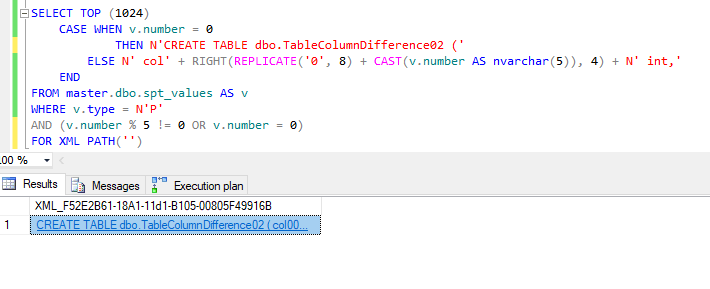
With a recent post by Kenneth Fisher ( blog | twitter ) out about T-SQL FizzBuzz, I’m going to create two tables, both of which will have incrementing column names i.e. col00001, col00002, …, col1024. Table1 will have all columns divisible by 3 removed while Table2 will have all columns divisible by 5 removed.
See, FizzBuzz can be useful!
So our table creation scripts…
SELECT TOP (1024)
    CASE WHEN v.number = 0
        -- Change this to 02 the second run through
        THEN N'CREATE TABLE dbo.TableColumnDifference01 ('
    ELSE N' col' + RIGHT(REPLICATE('0', 8) + CAST(v.number AS nvarchar(5)), 4) + N' int,'
    END
  FROM master.dbo.spt_values AS v
 WHERE v.type = N'P'
   AND (
       -- Change this to '% 5' the second run through
       v.number % 3 != 0
       OR v.number = 0
)
FOR XML PATH('')
See Note
NOTE:When you copy and paste the results of this query into a new window to open it, it is going to fail. Why? Well the end of the script is going to be along the lines of colN int, and it needs to be colN int). Why is it like this? Well it was taking to damn long to script that out. Feel free to change this to work for you. Hey if you do, let me know!
Now, how I’m going to do test this, is run each method 3 times (PIVOT, UNION, and PowerShell), then measure the third run of each method. This is mainly as I want to get rid of any “cold cache” issues with SQL Server where the plan has to be compiled or the data brought into memory.
…do it Pivot
So first up is the Pivot method from the last blog post. In case you’re playing along at home (and go on, do! Why should kids get all the fun) here is the code that I’m running.
And here is our results:
Yup, those be columns
What we are really after though is the stats, execution plan and time to complete for our 3rd execution. Now as much as I love reading the messages tab for the stats information, I feel with blog posts that aesthetics is king, so I’m going to be using the free tool by Richie Rump ( twitter ) “Statistics Parser“
Stats:
Elapsed time: 00:00:00.136
Execution Plan:
Probably the first plan I’ve seen where the SORT isn’t the most expensive!
..do it UNION
Secondly we have what I dubbed “the UNION method” (no points for figuring out why) and the only change I’ve made to this script is to add in PARSENAME() and that’s only so that the script would..you know…work.
Yeah…so…that’s…that’s different from the first plan! I was right in my comment though, there is a concatenation operator (there’s actually 2, you may need to zoom in to find them though)
…do it PowerShell
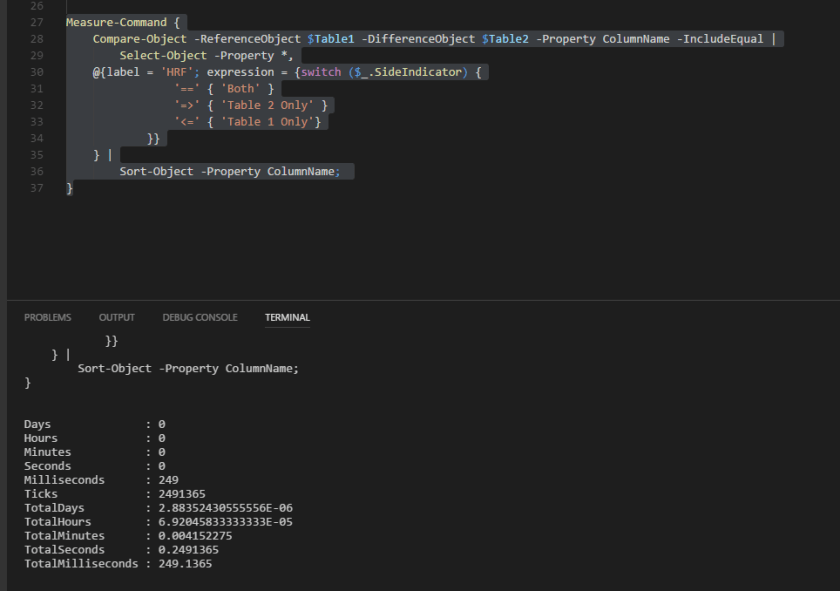
Finally we have the PowerShell method. No messing about here, let’s get straight to it! I’m going to lump all the code together in one gist and I’ll be wrapping it in Measure-Command to get the speed of the command.
Get-Results
Yeah I’m liking VS Code more and more…
Get-Stats:
Elapsed time: 00:00:00.249
help *execution*; help *plan*
Would you believe that I couldn’t figure out how to get an execution plan for PowerShell 🙂
If anybody knows, hit me up!
Finishing off
You know at the start of this, I was fully expecting the PowerShell to win out, followed by the UNION method, because it’s use of UNION, EXCEPT, and INTERSECT which are basically made for this kind of problem, and the PIVOT method bringing up a distant last since PIVOTs have this complexity stigma attached to them and what is complex is normally slow.
From a sheer speed point of view, the actual results are:
Pivot
PowerShell
Union
Who knew!?
I don’t think this is the end of my use of PowerShell or Union operators though. I’m not going to replace all the stuff that I can with Pivots. For one I just think that PowerShell and the Union operators are just too cool!
I actually like this result for two reasons.
There are multiple way to do something in SQL, there are good ways and better ways. The main point is whatever option you choose, make sure you know what it entails and can justify it. Whatever works for you, works for you!
You don’t know something, test it and find out! What you think the outcome may be, may not be true.
Now if you’ll excuse me, I want to figure out if there’s a way to return execution plans with PowerShell.
Straight away I want to apologise for the Nicolas Cage memes!
User Groups are great, aren’t they?
I just got back from the Reading User Group and I’m still in that post “User Group Glow”, also known as “Long Day Lethargy”, or “Twelve Hour Tiredness”.
They are great though! A chance to talk to other people in the SQL Server community, – a slight reminder that even if you work alone, people are still experiencing some of the same problems that you are (apparently everyone has to deal with multiple nested views, who knew!) – a chance to hear presentations on different topics, and pizza if you’re lucky (we were).
They’re really great!
I realised during the session that the two presentations given during the User Group had a connection with a small issue with a table change I had been given with a developer.
Here’s what did not happen to me so you can watch out for it.
The Chaos Theory
Nic Chaos
Raul Gonzalez ( blog | twitter ) was first up with this presentation “Database Design Matters, Seriously”, showing us the chaos that can occur from not giving some serious thought into how you design your database.
His session is not yet up on his blog as I’m writing this but it will be soon so keep an eye out for that!
Now he had a lot of good points but, for brevity’s sake, the main chaos theory points here are what happens if you don’t take advantage of CHECK CONSTRAINTS, FOREIGN KEY CONSTRAINTS, and not specifying a columns NULLABILITY (yes, that’s a word!). SQL Server is a powerful program with many performance optimizations provided for you, but it’s not omniscient; it can only use the information that you give it!
His points on NULLABILITY (I mean, I think it’s a word) tied in nicely with the next presentation…
Compound Effects
Compound Effects
David Morrison ( blog | twitter ) followed up with his presentation on “Query Plan Deep Dives” (I had seen this at SQL Bits, but it’s a great session so I had no problems watching it again) and, as an aside, through his presentation he showed us the compound effects that can happen from not specifying a columns NULLABILITY (it’s got letters so it’s word-like…)
Now his slides and scripts are up on his blog and they do a great job of walking you through them so check them out and you’ll see the compound effects they create!
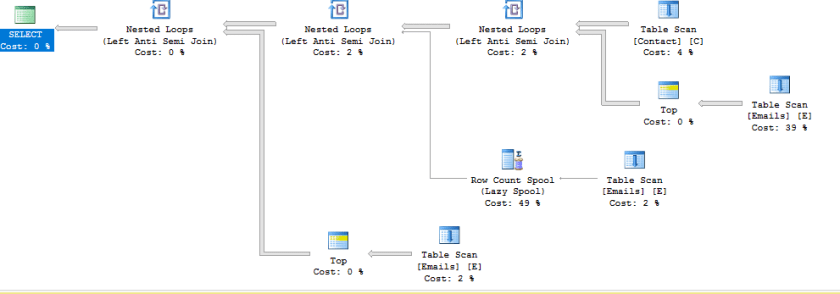
Here’s a little teaser…
-- now I want all people who's email isn't in the email table
SELECT /*C.FirstName ,
    C.LastName ,*/
    C.EmailAddress
FROM dbo.Contact AS C
WHERE C.EmailAddress NOT IN (SELECT E.EmailAddress
                             FROM dbo.Emails AS E)

GO
This should be A LOT simpler!!!
Consequences
Which brings us back around to consequences or as I like to put it “How I Pissed Off A Dev By Refusing A Simple Request”.
To be quite honest, it was a simple request. A requirement came in to expand a column datatype up to varchar(100), so one of devs wrote up a simple script and passed it onto the DBAs to check as part of the change control procedure.
ALTER TABLE tablename
ALTER COLUMN columnname varchar(100)
And I said no.
“WHY???!!!“, you may shout at me (he certainly did), but I’m going to say to you what I said to him. “Give me a chance to explain before you take my head off, alright?”
Argue with a DBA, go on!
While there is nothing wrong with the above code syntactically (is that a word?) but I couldn’t approve it since that column was originally NOT NULL and the above script would have stripped the column of that attribute! Business requirements dictated that it should not allow NULLS, and hey, who are we to argue with that 😐
Double checking to see if the column is NULL or NOT NULL allowed me to see a problem with that code, one that many people would consider simple enough to just allow it through at a quick glance. Which could have opened up problems further down the line if it had run…
Thanks to the User Group, I now know that it could have a knock on effect with our query plans as well!
ALTER TABLE tablename
ALTER COLUMN columnname varchar(100) NOT NULL
There, that’s better!
DBAs deal with databases and consequences
DBAs get a lot of stick sometime, the “Default Blame Acceptors” or the “Don’t Bother Asking” but a lot of the time, it’s not that we want to say no, it’s just that we have to take into consideration a thousand little things that could snowball into 1 giant problem.
“Not this second, let me check it out and see what we can do”
If pressed further, we may rely on the good, old “it depends” though. Hey, clichés are there for a reason; they work!
It just goes to show that, like the IT profession, DBAs are constantly evolving.
Continuosly learning, checking out new helping technologies, and going to User Groups are going to help us to deal with it.
Just remember, in the end,
P.S. I should probably mention that the Nicolas Cage memes are because of this blog post by Nate Johnson ( blog ) that I enjoyed so much that I had to do something in response. I’m not normally this crazy, I swear!
Ever created an XML Schema collection before? Our developers work with a lot of XML so I wasn’t surprised when eventually a request came in about permissions with XML SCHEMA COLLECTION.
Surprised that they had a permissions issue, yes, but not surprised that they were working with XML.
Why is it “an XML” and not “a XML”?
For information purposes, I’d normally provide a brief description of what an XML SCHEMA COLLECTION is but, being completely honest, I’m still not sure I can vocalize it in an understandable way. It’s kind of like explaining the colour purple without using other colours (and yes, that’s colour with a ‘u’).
I know what it is, I just can’t explain it properly…yet
So what I’m going to do is point you to the link for Microsoft docs for XML Schema Collection (done) and just gloss right over it (nothing to see here).
Permissions Shane, you mentioned permissions.
Right, sorry.
Investigation first. This was on the Development server and they had emailed me the creation code along with the error message they had received, which was this guy:
CREATE XML SCHEMA COLLECTION name AS
N'RANDOM XML ALERT...'
Msg 2797, Level 16, State 2, Line 20
The default schema does not exist.
However, when I ran the code, I got a different error message, mainly this guy:
CREATE XML SCHEMA COLLECTION name AS
N'RANDOM XML ALERT...'
Msg 9459, Level 16, State 1, Line 3
XML parsing: line 2, character 34, undeclared prefix
Which meant I had to go back and tell them to fix their darn XML.
Now I’m pretty sure we have a problems though:
That error message did not fill me with confidence. Yeah, sure they had bad XML but I was now fairly sure that there was also a permissions problem. Mainly because if there’s one thing that I’ve learned so far, it’s this:
No good can come from two different people getting two different errors from the same code!
Proper XML:
Proper XML was provided and ran by the developers but the same error message came back…
CREATE XML SCHEMA COLLECTION name AS
N'random xml alert...'
Msg 2797, Level 16, State 2, Line 20
The default schema does not exist.
The difference this time was, when I ran the code, I received the following message
Command(s) completed successfully.
…That’s not good.
Developers happy. DBAs not.
At this stage, I’m nearly convinced that it’s a permissions issue.
In my head I’m thinking of all the things that I can do to try and troubleshoot this problem.
Extended Events my session,
Ask my Senior DBA,
Cry
Then I realize that I’m jumping the gun again and I slow down, and check the first error message again. This time without the developers shouting in my ear, about permissions.
The DEFAULT schema
That says “schema”, not “permission”. Maybe the difference between the DBAs and the Devs was to do with default schema and not permissions this time. Let’s check it out!
SELECT
    IIF(principal_id = 1, 'DBA', 'Dev') AS DBPrincipal,
    default_schema_name
FROM sys.database_principals
WHERE principal_id IN (1, 14);
Devs don’t even have a default schema!
Wait, so it was a SCHEMA issue?
Have you checked the Examples section of Microsoft Docs? Normally, they are a great source of material for examples but if you check out the examples for XML Schema Collection , not one of them shows the schema name in the examples.
So, I walk over to the original developer and his machine, change his code to…
CREATE XML SCHEMA COLLECTION dbo.name_test AS
N'RANDOM XML ALERT...'
And it works!
Apparently what had happened was the Senior Dev had gotten sick of developers not specifying the schema when creating objects and had asked the Senior DBA to remove the default schema for Developers. That seems to work (by that I mean, everything error-ed out correctly), they were happy that developers now had to specify the schema, and life moved on.
Yet, later on, when the developer read the docs for XML Schema Collection, and saw that there was no schema in the examples, it didn’t cross their mind that a schema was required. So they didn’t specify it and that, in combination with no default schema, caused this whole mess.
The (fast food) takeaways:
Slow down! Don’t jump the gun,
Developers don’t know everything,
It’s not always permissions,
Schemas are important(!),
Having checklists for investigations are highly useful, and
Documentation, especially on past decisions, are even more useful!
Apologies for the blurb of a blog post but I have to go.
Apparently, there’s a permissions issue with a Stored Procedure now…
This post started after I created a function for dbatools, was resurrected when talking to Chrissy LeMaire ( blog | twitter ) then died down again afterwards. At this stage, I figure I publish it now or I’ll never finish it.
2 fricking hours…
I’m a Junior DBA, and as one, I get given the graft work.
For me that meant manually checking the backups. Every single file of every single database of every single server, every single day…plus whatever other jobs and alerts had come in overnight.
As you can imagine, it took a while (OVER 2 HOURS!!!) and since my youth, I had leveled-up from ‘laziness’ to ‘efficiency’, so I wanted a better option.
I had heard about PowerShell as a language before and wanted to check out if it was possible to use it to help me out.
So I opened up my PowerShell ISE, rested my fingers on the keyboard and…nothing.
So I checked out solutions online, and it was there that I found dbatools.io!
They had everything – or what I thought was everything since they have an issues page in github with over 100 items – so one Friday night I downloaded their tools at home and started getting familiar with them. (I know, rock star lifestyle that I have).
Monday morning, bright-eyed, bushy-tailed and filled with coffee, I sit down at my computer, open up PowerShell to start my graft work, and in 2 minutes I was finished.
2 fricking minutes…
With that, I was hooked; Twitter account, followed, Slack channel, signed in, anything and everything I could do to learn more about this wonderful life-saving (I figure time is life ergo this was life-saving) tool I was in!
But it wasn’t enough… they had given to me and I had no method to repay them.
Then one day, I asked a question on PowerShell help and one of their members Constantine Kokkinos ( blog | twitter ) helped me, and we got chatting.
He gave me an enhancement request to look at and I spent 3 days looking, poking and prodding it until finally I gave up and did a replace to fix it.
I then proceeded to try and push my entire computer into their Git repository but CK laughed and help me fix that too.
Then, from nowhere from my point of view, Chrissy LeMaire said she like it and, like that, it was in!
I’ve done more stuff since then, one more enhancement that wasn’t accepted (no worries) and a command that was accepted (that I am ashamed about since I think it’s not good enough), but I am constantly thankful for the work that they do and the knowledge that they impart.
2 commits later…
I know, I know, here I am trying to wax lyrical about dbatools when I’ve only done 2 commits.
What can I say, I’ve slowly gotten busier and busier to the point that I’m trying to schedule my days to fit everything in (if you had told me earlier that I would become a “not enough hours in the day” guy…).
Does this mean that my love for dbatools has weaned? Not in the slightest! I’m still impressed every single time that I look in (seeing as that is every day, I’m spending a lot of my time being impressed) and I’m still trying to get back to it.
2 things left to say…
To anyone hesitant about getting started with dbatools, whether that is helping out or using them, I urge you not to be.
They are welcoming, warm, and inviting people who are happy to receive help from anyone willing to give it.
I’ll eventually get around to fixing that issue Chrissy, I swear 🙁
Where I compare scripts to BBQ because of course I would 😐
I have this personal opinion that one sign of a good DBA is their ability to automate things and, before the DBA world found PowerShell, the way to do this was with T-SQL.
For example, a T-SQL script to get permissions assigned to a database principal could also include a column to REVOKE those permissions. This could be “automated” with some dynamic SQL.
SELECT dprin.name AS DatabasePrincipalName,
       OBJECT_NAME(dperm.major_id) AS ObjectName,
       dperm.permission_name AS PermissionName,
       N'REVOKE '
         + dperm.permission_name
         + N' ON OBJECT::'
         + OBJECT_NAME(dperm.major_id)
         + N' FROM '
         + dprin.name COLLATE Latin1_General_CI_AS AS RevokeMe
FROM sys.database_permissions AS dperm
INNER JOIN sys.database_principals AS dprin
  ON dperm.grantee_principal_id = dprin.principal_id
WHERE dprin.name = 'public';
This can be improved A WHOLE LOT…
What about if we want to improve this?
This is nice but what about if we are paranoid forward-thinking enough to realize that this could cause us problems?
“How?” You ask. Well what happens if there existed another database, say [NeedsAllPermissions], with the same table name and the same login has permissions on it.
Are you going to revoke permissions from that database? It needs ALL of them! It says so in the name!
So in an effort to not shoot ourselves in the foot, we add in the database name to our revoke script.
SELECT dprin.name AS DatabasePrincipalName,
       OBJECT_NAME(dperm.major_id) AS ObjectName,
       dperm.permission_name AS PermissionName,
       N'USE '
         + DB_NAME()
         + 'GO'
         + N'REVOKE '
         + dperm.permission_name
         + N' ON OBJECT::'
         + OBJECT_NAME(dperm.major_id)
         + N' FROM '
         + dprin.name COLLATE Latin1_General_CI_AS AS RevokeMe
FROM sys.database_permissions AS dperm
INNER JOIN sys.database_principals AS dprin
  ON dperm.grantee_principal_id = dprin.principal_id
WHERE dprin.name = 'public';
Yes, we’re only using our database now!
So all is well with the world…
Until the day comes when you actually want to revoke permissions to that user. So you run the above code, copy the RevokeMe column and paste it into the management window. and you get…
No GO my friend…
GO is a special little guy. It’s not exactly T-SQL. It’s a way of telling the SQL Server Management Studio (SSMS) to send everything before it, from the beginning of the script or the preceding GO, to the SQL Server instance.
A Transact-SQL statement cannot occupy the same line as a GO command. However, the line can contain comments.
GO is a special little snowflake and needs to be on his own line then. Simple enough if you know that SQL Server converts CHAR(10) into a New Line.
If you didn’t know that, well you know that now….P.S. CHAR(13) is a carriage return 😉
So let’s update our script with some CHAR(10) and see what happens then.
SQL & BBQ, both work well with CHAR
SELECT dprin.name AS DatabasePrincipalName,
       OBJECT_NAME(dperm.major_id) AS ObjectName,
       dperm.permission_name AS PermissionName,
       N'USE '
         + DB_NAME()
         + CHAR(10)
         + 'GO'
         + CHAR(10)
         + N'REVOKE '
         + dperm.permission_name
         + N' ON OBJECT::'
         + OBJECT_NAME(dperm.major_id)
         + N' FROM '
         + dprin.name COLLATE Latin1_General_CI_AS AS RevokeMe
FROM sys.database_permissions AS dperm
INNER JOIN sys.database_principals AS dprin
  ON dperm.grantee_principal_id = dprin.principal_id
WHERE dprin.name = 'public';
That smokey, wood-fire CHAR
Now, when we paste the RevokeMe column to a new window, we get…
Oh look, it’s a wild, rare nothing…I love them!
…absolutely no difference. 🙂
Why am I smiling?
Here, around 500 words in, we get to the meat of our post. How do we keep new lines when copying in SQL Server?
Tools | Options | Query Results | Results to Grid | Retain CR/LF on copy or save
Two things need to be done here.
This checkbox needs to be enabled.
CHECK!
A new window needs to be opened and used.
New window open, we run our script again, and this time, when we copy and paste the results, we get…
Winner, Winner, BBQ Chicken Dinner
Dessert:
So if you are using T-SQL to create scripts, and you’re having this problem with GO or just new lines in general, make sure that the “retain CR/LF on copy and save” checkbox is ticked.
Now, improve that script more, throw it in a stored procedure, and you never know, it may be semi-useful. 🙂
XML – both easy, easy, lemon easy and difficult, difficult, lemon difficult…
Working on a blog post and I came up against a problem that I had heard of before but did not spend much brain-CPU power against.
I know I’m going to run into this again so let’s document this for future me. Oh he’s going to appreciate this so much!
Commas are all the rage nowadays:
There are a fair number of questions nowadays about returning data from a database in a comma separated string. Sure the application should probably do that but hey, database servers are expensive, why not get some bang for your bucks!
Pop in your column and your separator and it takes care of it for you!
…wait not everyone has SQL Server 2017 yet?
…wait I don’t have SQL Server 2017 yet? Oh, I should really fix that…
Pre-SQL Server 2017:
So what can we do if we are not on SQL Server 2017? Take the advice that I was given for most of my life and STUFF it!
The STUFFing:
Our playground:
USE tempdb;

-- Test table
SELECT dt.comments
FROM ( VALUES ( 'XML is the bomb!'),
              ( '& JSON is cool too...')
     ) AS dt (comments);
testing stuff…
Plain Old STUFFing:
I’m not the biggest fan of stuffing if I’m honest…tastes like dirt to me but hey, it works in 99% of situations…
SELECT STUFF((SELECT ', ' + dt.comments
              FROM ( VALUES ( 'XML is the bomb!'),
                            ( '& JSON is cool too...')
                   ) AS dt (comments)
              FOR XML PATH('')
             ), 1, 1, '') AS CommentsEnXML;
…that’s…that’s not what I said!
Bacon Sausage STUFFing however:
So…SQL Server is trying to be too helpful. What do we do? I normally turn to the SQL community and people like Rob Farley ( blog | twitter ), who has a lovely post about this.
So let’s try it out.
SELECT STUFF((SELECT ', ' + dt.comments
              FROM ( VALUES ( 'XML is the bomb!'),
                            ( '& JSON is cool too...')
                   ) AS dt (comments)
              FOR XML PATH(''),
              TYPE).value('.', 'varchar(max)'
             ), 1, 1, '') AS CommentsEnXML;
That exclamation mark is annoying me >:(
I just eat the turkey around the STUFFing:
Little hiccup in preparing for my next post. Thankfully I learn from my mistakes and failures (there’d be no help for me otherwise!).
I’ll leave this post with a quote from the blog of the main man himself: