Shane, what’s wrong with DELETE EXISTS?

I tried to explain it but I hope you can do it better.

I’m not sure if it’s a good sign or a bad sign if that is the message that greets you when you sign into a chat room. It conjures up a response somewhere along the lines of “…oh no” but I like helping out and the person who asked this is bright and passionate about SQL Server; just not fully experienced with it yet.

The Code:

So, drinking my first (of many) coffee of the day, I asked him what was wrong with it.

I have two tables. 1 with values 1,2,3 & the other with values 1,2,3,4,5. When I use delete exists, it should just delete 1,2,3 but table1 is always empty.

Hmmm, not an unreasonable assumption I suppose so I asked him for his code.


DECLARE @t1 table (id1 int);
DECLARE @t2 table (id2 int);

INSERT INTO @t1
VALUES (1),
 (2),
 (3),
 (4),
 (5);
INSERT INTO @t2
VALUES (1),
 (2),
 (3);

DELETE FROM @t1
WHERE EXISTS
 ( SELECT *
 FROM @t1 AS d1
 JOIN @t2 AS d2
 ON d1.id1 = d2.id2
 );

SELECT *
FROM @t1;

That should return 4 and 5 but @t1 is empty! What’s wrong with it?

You may know…

…what the problem is here, I knew what the problem was here. My question for you though is how would you explain it?

I’ll give you my go but you make your own. Here’s the basic of that conversation.

You’re deleting everything from @t1 if your exists returns any rows.
You’re not limiting it at all. You need to remove the second call to the table, the one in your EXISTS, and link it back.
DELETE FROM @t1 AS t1 WHERE EXISTS( SELECT * FROM @t2 AS t2 WHERE t1.id1 = t2.id2)

> Ok, but when it like DELETE FROM @t1 WHERE EXISTS(SELECT * FROM @t2) it should return 4 and 5 too because @t2 just has 1,2,3.

Nope, you’re saying delete from table1 if your exists (RETURNS ANYTHING AT ALL) because you’re not specifying a link back to the first table

> but SELECT * FROM @t2 returns 1,2,3 and @t1 has 1,2,3,4,5?

Yeah but EXISTS technically returns a TRUE or a FALSE. So you’re saying DELETE if TRUE, not DELETE if table1 = table2.

> ahhhhh! Ok I got’cha now

I do not like that explanation though…

It seemed to work, for him at least but I don’t really think that is the best way to explain it.

I had to specify two things

  1. EXISTS is about TRUE or FALSE
  2. If you want to be selective, you need to link back.

My problem is the documentation on EXISTS says (abbreviated)…

Specifies a subquery to test for the existence of rows.

[…]

Result Types

Boolean

Result Values

Returns TRUE if a subquery contains any rows.

…and I’m not sure if that is any better of an explanation.

What I am sure of though is, if I want to continue to help out, I’ll need to know these topics implicitly and be able to explain them properly.

How would you explain EXISTS?

Let me know, and remember that your explanation should be able to explain this code by Adam Machanic ( twitter ) and Steve Jones ( twitter | blog ).

Be careful! Run this piece of code, the results may not be what you think

SELECT
*
FROM ( VALUES ( 1), ( 2) ) AS x ( i )
WHERE EXISTS ( SELECT MAX(y.i)
FROM
( VALUES ( 1) ) AS y ( i )
WHERE
y.i = x.i );


Best o’luck!

Table Column Differences with T-SQL and PowerShell – Part 2

If this was a horror movie, it would be called “The Differencing”…duh duh duh!

Time to read: ~ 5 minutes

Words: 1057

Update 2021-07-14: Marked code blocks as preformatted

The original post for this topic garnered the attention of a commenter who pointed out that the same result could be gathered using a couple of UNION ALLs and those lovely set-based EXCEPT and INTERSECT keywords.

I personally think that both options work and whatever you feel comfortable with, use that.

It did play on my mind though of what the performance differences would be…what would the difference in STATISTICS IO, TIME be? What would the difference in Execution Plans be? Would there even be any difference between the two or are they the same thing? How come it’s always the things I tell myself not to forget that I end up forgetting?

I have no idea about the last one but at least the other things we can check. I did mention to the commentor that I would find this an interesting blog topic if they wanted to give it a go and get back to me. All I can say is – Sorry, your mail must have got lost in transit. I’m sure it is a better blog post that mine anyway.

If you’re going to do it…

For this test, we’re not going to stop at a measely 4 columns per table. Oh no! For this one we’re going to go as wide as we can.

With a recent post by Kenneth Fisher ( blog | twitter ) out about T-SQL FizzBuzz, I’m going to create two tables, both of which will have incrementing column names i.e. col00001, col00002, …, col1024. Table1 will have all columns divisible by 3 removed while Table2 will have all columns divisible by 5 removed.

See, FizzBuzz can be useful!

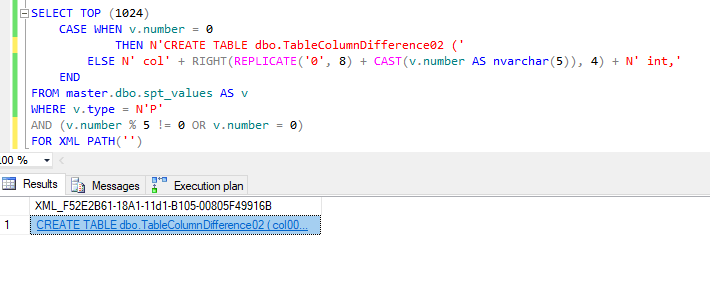
So our table creation scripts…

SELECT TOP (1024)
CASE WHEN v.number = 0
-- Change this to 02 the second run through
THEN N'CREATE TABLE dbo.TableColumnDifference01 ('
ELSE N' col' + RIGHT(REPLICATE('0', 8) + CAST(v.number AS nvarchar(5)), 4) + N' int,'
END
FROM master.dbo.spt_values AS v
WHERE v.type = N'P'
AND (
-- Change this to '% 5' the second run through
v.number % 3 != 0
OR v.number = 0
)
FOR XML PATH('')

TableCreationScript
See Note

NOTE: When you copy and paste the results of this query into a new window to open it, it is going to fail. Why? Well the end of the script is going to be along the lines of colN int, and it needs to be colN int). Why is it like this? Well it was taking to damn long to script that out. Feel free to change this to work for you. Hey if you do, let me know!

Now, how I’m going to do test this, is run each method 3 times (PIVOT, UNION, and PowerShell), then measure the third run of each method. This is mainly as I want to get rid of any “cold cache” issues with SQL Server where the plan has to be compiled or the data brought into memory.

…do it Pivot

So first up is the Pivot method from the last blog post. In case you’re playing along at home (and go on, do! Why should kids get all the fun) here is the code that I’m running.

And here is our results:

PivotMethodGridResults
Yup, those be columns

What we are really after though is the stats, execution plan and time to complete for our 3rd execution. Now as much as I love reading the messages tab for the stats information, I feel with blog posts that aesthetics is king, so I’m going to be using the free tool by Richie Rump ( twitter ) “Statistics Parser

Stats:

PivotMethodGridStats
Elapsed time: 00:00:00.136

Execution Plan:

PivotMethodGridPlan
Probably the first plan I’ve seen where the SORT isn’t the most expensive!

..do it UNION

Secondly we have what I dubbed “the UNION method” (no points for figuring out why) and the only change I’ve made to this script is to add in PARSENAME() and that’s only so that the script would..you know…work.

Results be like:

UnionMethodGridResults
Yep, Yep, Yep, Yep, Nope, Yep…

Stats:

UnionMethodGridStats
Elapsed time: 00:00:00.624

hmm…less Scan Counts but 5 times the reads…also 5 times slower than the PIVOT method. Maybe the execution plan will be prettier?

Execution Plan:

UnionMethodGridPlan.png
ehh…WHAT!

Yeah…so…that’s…that’s different from the first plan! I was right in my comment though, there is a concatenation operator (there’s actually 2, you may need to zoom in to find them though)

…do it PowerShell

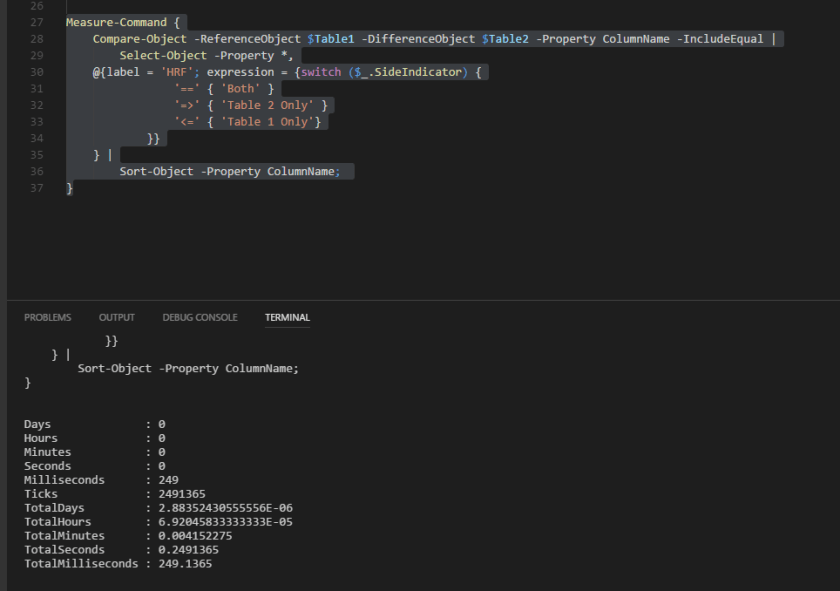
Finally we have the PowerShell method. No messing about here, let’s get straight to it! I’m going to lump all the code together in one gist and I’ll be wrapping it in Measure-Command to get the speed of the command.

Get-Results

PoSHMethodGridResults
Yeah I’m liking VS Code more and more…

Get-Stats:

PoSHMethodGridStats.png
Elapsed time: 00:00:00.249

help *execution*; help *plan*

Would you believe that I couldn’t figure out how to get an execution plan for PowerShell 🙂

If anybody knows, hit me up!

Finishing off

You know at the start of this, I was fully expecting the PowerShell to win out, followed by the UNION method, because it’s use of UNION, EXCEPT, and INTERSECT which are basically made for this kind of problem, and the PIVOT method bringing up a distant last since PIVOTs have this complexity stigma attached to them and what is complex is normally slow.

From a sheer speed point of view, the actual results are:

  1. Pivot
  2. PowerShell
  3. Union

Who knew!?

I don’t think this is the end of my use of PowerShell or Union operators though. I’m not going to replace all the stuff that I can with Pivots. For one I just think that PowerShell and the Union operators are just too cool!

I actually like this result for two reasons.

  1. There are multiple way to do something in SQL, there are good ways and better ways. The main point is whatever option you choose, make sure you know what it entails and can justify it.
    Whatever works for you, works for you!
  2. You don’t know something, test it and find out! What you think the outcome may be, may not be true.

Now if you’ll excuse me, I want to figure out if there’s a way to return execution plans with PowerShell.

Chaos Theory, Compound Effects, and Consequences.

Straight away I want to apologise for the Nicolas Cage memes!

User Groups are great, aren’t they?

I just got back from the Reading User Group and I’m still in that post “User Group Glow”, also known as “Long Day Lethargy”, or “Twelve Hour Tiredness”.

They are great though! A chance to talk to other people in the SQL Server community, – a slight reminder that even if you work alone, people are still experiencing some of the same problems that you are (apparently everyone has to deal with multiple nested views, who knew!) – a chance to hear presentations on different topics, and pizza if you’re lucky (we were).

WishYouWereHere.PNG
They’re really great!

I realised during the session that the two presentations given during the User Group had a connection with a small issue with a table change I had been given with a developer.

Here’s what did not happen to me so you can watch out for it.

The Chaos Theory

NicCageChaos.PNG
Nic Chaos


Raul Gonzalez ( blog | twitter ) was first up with this presentation “Database Design Matters, Seriously”, showing us the chaos that can occur from not giving some serious thought into how you design your database.

His session is not yet up on his blog as I’m writing this but it will be soon so keep an eye out for that!

Now he had a lot of good points but, for brevity’s sake, the main chaos theory points here are what happens if you don’t take advantage of CHECK CONSTRAINTS, FOREIGN KEY CONSTRAINTS, and not specifying a columns NULLABILITY (yes, that’s a word!). SQL Server is a powerful program with many performance optimizations provided for you, but it’s not omniscient; it can only use the information that you give it!

His points on NULLABILITY (I mean, I think it’s a word) tied in nicely with the next presentation…

Compound Effects

NicCageChaos.PNG
Compound Effects

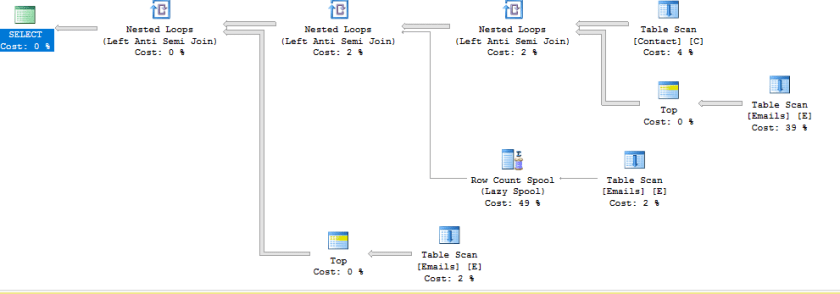
David Morrison ( blog | twitter ) followed up with his presentation on “Query Plan Deep Dives” (I had seen this at SQL Bits, but it’s a great session so I had no problems watching it again) and, as an aside, through his presentation he showed us the compound effects that can happen from not specifying a columns NULLABILITY (it’s got letters so it’s word-like…)

Now his slides and scripts are up on his blog and they do a great job of walking you through them so check them out and you’ll see the compound effects they create!

Here’s a little teaser…


-- now I want all people who's email isn't in the email table
SELECT /*C.FirstName ,
    C.LastName ,*/
    C.EmailAddress
FROM dbo.Contact AS C
WHERE C.EmailAddress NOT IN (SELECT E.EmailAddress
                             FROM dbo.Emails AS E)

GO

NULLABILITY.png
This should be A LOT simpler!!!

Consequences

Which brings us back around to consequences or as I like to put it “How I Pissed Off A Dev By Refusing A Simple Request”.

To be quite honest, it was a simple request. A requirement came in to expand a column datatype up to varchar(100), so one of devs wrote up a simple script and passed it onto the DBAs to check as part of the change control procedure.

ALTER TABLE tablename
ALTER COLUMN columnname varchar(100)

And I said no.

WHY???!!!“, you may shout at me (he certainly did), but I’m going to say to you what I said to him. “Give me a chance to explain before you take my head off, alright?”

ArgumentInvalid.PNG
Argue with a DBA, go on!

While there is nothing wrong with the above code syntactically (is that a word?) but I couldn’t approve it since that column was originally NOT NULL and the above script would have stripped the column of that attribute! Business requirements dictated that it should not allow NULLS, and hey, who are we to argue with that 😐

Double checking to see if the column is NULL or NOT NULL allowed me to see a problem with that code, one that many people would consider simple enough to just allow it through at a quick glance. Which could have opened up problems further down the line if it had run…

Thanks to the User Group, I now know that it could have a knock on effect with our query plans as well!

ALTER TABLE tablename
ALTER COLUMN columnname varchar(100) NOT NULL

There, that’s better!

DBAs deal with databases and consequences

YDS.PNG


DBAs get a lot of stick sometime, the “Default Blame Acceptors” or the “Don’t Bother Asking” but a lot of the time, it’s not that we want to say no, it’s just that we have to take into consideration a thousand little things that could snowball into 1 giant problem.

With the rise of DevOps, check out the latest T-SQL Tuesday, DBAs have gone from going

“No”

to somewhere along the lines of

“Not this second, let me check it out and see what we can do”

If pressed further, we may rely on the good, old “it depends” though. Hey, clichés are there for a reason; they work!

It just goes to show that, like the IT profession, DBAs are constantly evolving.
Continuosly learning, checking out new helping technologies, and going to User Groups are going to help us to deal with it.

Just remember, in the end,

LeFin.PNG

P.S. I should probably mention that the Nicolas Cage memes are because of this blog post by Nate Johnson ( blog ) that I enjoyed so much that I had to do something in response. I’m not normally this crazy, I swear!

Problems Creating XML Schema Collection

Ever created an XML Schema collection before? Our developers work with a lot of XML so I wasn’t surprised when eventually a request came in about permissions with XML SCHEMA COLLECTION.

Surprised that they had a permissions issue, yes, but not surprised that they were working with XML.

Why is it “an XML” and not “a XML”?

For information purposes, I’d normally provide a brief description of what an XML SCHEMA COLLECTION is but, being completely honest, I’m still not sure I can vocalize it in an understandable way. It’s kind of like explaining the colour purple without using other colours (and yes, that’s colour with a ‘u’).

I know what it is, I just can’t explain it properly…yet

So what I’m going to do is point you to the link for Microsoft docs for XML Schema Collection (done) and just gloss right over it (nothing to see here).

Permissions Shane, you mentioned permissions.

Right, sorry.

Investigation first. This was on the Development server and they had emailed me the creation code along with the error message they had received, which was this guy:

CREATE XML SCHEMA COLLECTION name AS
N'RANDOM XML ALERT...'

Msg 2797, Level 16, State 2, Line 20
The default schema does not exist.

However, when I ran the code, I got a different error message, mainly this guy:

CREATE XML SCHEMA COLLECTION name AS
N'RANDOM XML ALERT...'

Msg 9459, Level 16, State 1, Line 3
XML parsing: line 2, character 34, undeclared prefix

Which meant I had to go back and tell them to fix their darn XML.

Now I’m pretty sure we have a problems though:

That error message did not fill me with confidence. Yeah, sure they had bad XML but I was now fairly sure that there was also a permissions problem. Mainly because if there’s one thing that I’ve learned so far, it’s this:

No good can come from two different people getting two different errors from the same code!

Proper XML:

Proper XML was provided and ran by the developers but the same error message came back…

CREATE XML SCHEMA COLLECTION name AS
N'random xml alert...'

Msg 2797, Level 16, State 2, Line 20
The default schema does not exist.

The difference this time was, when I ran the code, I received the following message

Command(s) completed successfully.

…That’s not good.

Developers happy. DBAs not.

At this stage, I’m nearly convinced that it’s a permissions issue.

Checking the permissions required to create an XML Schema Collection doesn’t help, since the Devs were part of the db_dlladmin database role, so that should have been covered.

In my head I’m thinking of all the things that I can do to try and troubleshoot this problem.

  1. Extended Events my session,
  2. Ask my Senior DBA,
  3. Cry

Then I realize that I’m jumping the gun again and I slow down, and check the first error message again. This time without the developers shouting in my ear, about permissions.

The DEFAULT schema

That says “schema”, not “permission”. Maybe the difference between the DBAs and the Devs was to do with default schema and not permissions this time. Let’s check it out!

SELECT
    IIF(principal_id = 1, 'DBA', 'Dev') AS DBPrincipal,
    default_schema_name
FROM sys.database_principals
WHERE principal_id IN (1, 14);

DiffSchema
Devs don’t even have a default schema!

Wait, so it was a SCHEMA issue?

Have you checked the Examples section of Microsoft Docs? Normally, they are a great source of material for examples but if you check out the examples for XML Schema Collection , not one of them shows the schema name in the examples.

So, I walk over to the original developer and his machine, change his code to…

 
CREATE XML SCHEMA COLLECTION dbo.name_test AS 
N'RANDOM XML ALERT...' 

And it works!

Apparently what had happened was the Senior Dev had gotten sick of developers not specifying the schema when creating objects and had asked the Senior DBA to remove the default schema for Developers. That seems to work (by that I mean, everything error-ed out correctly), they were happy that developers now had to specify the schema, and life moved on.

Yet, later on, when the developer read the docs for XML Schema Collection, and saw that there was no schema in the examples, it didn’t cross their mind that a schema was required. So they didn’t specify it and that, in combination with no default schema, caused this whole mess.

The (fast food) takeaways:

  1. Slow down! Don’t jump the gun,
  2. Developers don’t know everything,
  3. It’s not always permissions,
  4. Schemas are important(!),
  5. Having checklists for investigations are highly useful, and
  6. Documentation, especially on past decisions, are even more useful!

Apologies for the blurb of a blog post but I have to go.
Apparently, there’s a permissions issue with a Stored Procedure now…


Why I *try* to help with dbatools?

Can I get a couple more hours in each day please?

This post started after I created a function for dbatools, was resurrected when talking to Chrissy LeMaire ( blog | twitter ) then died down again afterwards. At this stage, I figure I publish it now or I’ll never finish it.


2 fricking hours…

I’m a Junior DBA, and as one, I get given the graft work.

For me that meant manually checking the backups. Every single file of every single database of every single server, every single day…plus whatever other jobs and alerts had come in overnight.

As you can imagine, it took a while (OVER 2 HOURS!!!) and since my youth, I had leveled-up from ‘laziness’ to ‘efficiency’, so I wanted a better option.

I had heard about PowerShell as a language before and wanted to check out if it was possible to use it to help me out.

So I opened up my PowerShell ISE, rested my fingers on the keyboard and…nothing.

So I checked out solutions online, and it was there that I found dbatools.io!

They had everything – or what I thought was everything since they have an issues page in github with over 100 items – so one Friday night I downloaded their tools at home and started getting familiar with them. (I know, rock star lifestyle that I have).

Monday morning, bright-eyed, bushy-tailed and filled with coffee, I sit down at my computer, open up PowerShell to start my graft work, and in 2 minutes I was finished.

2 fricking minutes…

With that, I was hooked; Twitter account, followed, Slack channel, signed in, anything and everything I could do to learn more about this wonderful life-saving (I figure time is life ergo this was life-saving) tool I was in!

But it wasn’t enough… they had given to me and I had no method to repay them.

Then one day, I asked a question on PowerShell help and one of their members Constantine Kokkinos ( blog | twitter ) helped me, and we got chatting.

He gave me an enhancement request to look at and I spent 3 days looking, poking and prodding it until finally I gave up and did a replace to fix it.

I then proceeded to try and push my entire computer into their Git repository but CK laughed and help me fix that too.

Then, from nowhere from my point of view, Chrissy LeMaire said she like it and, like that, it was in!

I’ve done more stuff since then, one more enhancement that wasn’t accepted (no worries) and a command that was accepted (that I am ashamed about since I think it’s not good enough), but I am constantly thankful for the work that they do and the knowledge that they impart.

2 commits later…

I know, I know, here I am trying to wax lyrical about dbatools when I’ve only done 2 commits.

What can I say, I’ve slowly gotten busier and busier to the point that I’m trying to schedule my days to fit everything in (if you had told me earlier that I would become a “not enough hours in the day” guy…).

Does this mean that my love for dbatools has weaned? Not in the slightest! I’m still impressed every single time that I look in (seeing as that is every day, I’m spending a lot of my time being impressed) and I’m still trying to get back to it.

2 things left to say…

  1. To anyone hesitant about getting started with dbatools, whether that is helping out or using them, I urge you not to be.
    They are welcoming, warm, and inviting people who are happy to receive help from anyone willing to give it.
  2. I’ll eventually get around to fixing that issue Chrissy, I swear 🙁