Temporary Tables Naming Constraints

Time to read: ~ 6 minutes

Words: 1151

Update: Thanks to “kuopaz”, for pointing out that I had forgotten to add the unnamed constraint to the example where I say unnamed constraints will work fine.

Introduction:

Kenneth Fisher (b | t)  recently wrote about Re-Evaluating Best Practices and, reading his post,  I couldn’t help but agree with him. Especially with regard to:

Times change, knowledge changes so best practices have to change. Don’t rest on your knowledge or the knowledge of others. Make sure you understand not only what the best practice is but why it’s the best practice. And then question it.

Kenneth Fisher

Now I’m not going to bring up the Microsoft PLE of 300 advice as that example has been taken out and waved in front of people’s faces so many times that I feel it’s lost it’s impact and, as far as I am aware, it’s the only case where the best practice is so widely ineffectual.

However, the statement…

Make sure you understand not only what the best practice is but why it’s the best practice.

Kenneth Fisher

… is, for me, the crucial statement in his post and the catalyst for the following post as I’ve fallen for a case where the best practices are not applicable; Naming Constraints.

Naming Constraints:

In this post, we are going to be looking at the best practice of giving logical, descriptive names to constraints in tables.

The following code is going to create a table called dbo.NamingConstraints with an Primary key column, a named constraint column and an unnamed constraint column.

Create dbo.NamingConstraints:

   CREATE TABLE [dbo].[NamingConstraints] (
        [ID]                 int IDENTITY(1, 1) CONSTRAINT [PK_NamingConstraint_ID] PRIMARY KEY,
        [NamedConstraint]    int                CONSTRAINT [NamedConstraint_gt_0] CHECK ([NamedConstraint] > 0),
        [UnNamedConstraint]  varchar(50) CHECK ([UnNamedConstraint] <> 'Forbidden')
    );

We can check these constraints with the following two queries, the first for the  Primary key, and the second for the CHECK constraints, with the results in Figure 1.1.

Constraint Check:

SELECT
   kc.[name],
   kc.[is_system_named],
   kc.[type_desc],
   kc.[unique_index_id]
FROM
   [sys].[key_constraints] AS kc
WHERE
   kc.[parent_object_id] = OBJECT_ID(N'[dbo].[NamingConstraints]', N'U');

SELECT
   cc.[name],
   cc.[is_system_named],
   cc.[type_desc],
   cc.[is_disabled],
   cc.[definition]
FROM
   [sys].[check_constraints] AS cc
WHERE
   cc.[parent_object_id] = OBJECT_ID(N'[dbo].[NamingConstraints]', N'U');
NamingConstraintsTable_Constraints
Figure 1.1

As Figure 1.1 shows us when we don’t specify a name for a constraint, SQL Server will assign a name to that constraint for us.

Why Naming Constraints is Best Practice.

Constraints are best used to ensure referential and data integrity. Therefore they are commonly seen when data considered against business logic is attempted to be inserted into the database, and error messages are thrown.

When these error messages occur, they normally are passed into error logs from whatever application is integreated into our database. In these cases it is easier to deal with descriptive names than non descriptive ones.

Taking our two CHECK constraints as examples, if we were to introduce error messages…

Create constraint errors:

/* UnNamed Constraint Violated */
INSERT INTO [dbo].[NamingConstraints] (
   [NamedConstraint],
   [UnNamedConstraint]
)
VALUES (
   1, 'Forbidden'
);

/* Named Constraint Violated */
INSERT INTO [dbo].[NamingConstraints] (
   [NamedConstraint],
   [UnNamedConstraint]
)
VALUES (
   -1, 'Allowed'
);

Looking at the first error message reported (Figure 2.1), we know from the error message that something is wrong in the Table dbo.NamingConstraints and the column is UnNamedConstraint but that is it. If this table had multiple constraints, and we weren’t the one to create this table and the constraints, we would have to do some (potentially lengthy) investigation to figure out what is causing the error and then correct it.

NamingConstraintsTable_UnNamedViolation
Figure 2.1

Compare that with the error message for our named constraint (Figure 2.2).

NamingConstraintsTable_NamedViolation
Figure 2.2

As we have a proper, descriptive constraint name here, straight away we can say that the error occurred as we tried to insert a value that was not greater than 0.

When Naming Constraints is not applicable.

TL;DR

Do not name constraints on temporary tables.

Why?

Why as in what would a use case for this be? I use this a lot to step through code with different variables, especially with stored procedures.

Two windows, side by side, running them step by step and comparing the results in each.

I know, fun right?…

Or why as in why should you not name constraints on temporary tables?
Well that’s going to require a bit more detail.

SQL Server requires a unique name on it’s objects as they must comply with the rules of identifiers.

So if we were troubleshooting a procedure and attempted to pass results into a temporary table…

CREATE TABLE #Temp02 (
   [Col1] int IDENTITY(1, 1) NOT NULL,
   [Col2] varchar(256) CONSTRAINT [Col2_neq_Forbidden] CHECK ([Col2] <> 'Forbidden')
);

INSERT INTO #Temp02 ([Col2])
SELECT
   [name]
FROM
   [sys].[all_objects];

SELECT
   *
FROM
   #Temp02;

… we should have no problem.

TempTableCreationNoErrors
Figure 3.1

But say we try to do that in two seperate windows…

SideBySideTempTableCreationErrors
Figure 3.2

… Big, angry error message telling usthat it could not create the constraint and that an object alreadt exists in the database.

Now say that we were to not explicitly name the constraints on these tables?

CREATE TABLE #Temp02 
(
Col1 int IDENTITY(1,1) NOT NULL,
Col2 varchar(256) CHECK (Col2 <> 'Forbidden')
);

INSERT INTO #Temp02 (Col2)
SELECT name FROM sys.all_objects;

SELECT * FROM #Temp02;
GO
NamingConstraints_NoConstraints
Figure 3.3 (works with an unnamed constraint as well)

No problem! Since we have not explicitly named the constraint, SQL Server does not violate it’s rule for identifiers and so does not throw an error message!

Caveats

Yes, I know that this could be classed as an extreme edge case but that is not the caveat that I’m talking about here.

If you are in the habit of not skipping over reading the actual SQL code, you may be wondering to yourself.

Well, the temp tables are called the same name and they should follow the rules for identifiers as well, no? Why aren’t they throwing an error?

Well that’s because temp tables are treated a bit differently than other objects.

Consider the following example where we try to find our temp table in TempDB:

SELECT * FROM tempdb.sys.tables WHERE name = '#Temp02';
NamingConstraints_NoResults_EqTempTable
Figure 4.1

Nothing. It doesn’t exist. But we didn’t drop it and we haven’t closed the scope so it can’t have just disappeared!

If we change our select statement to the LIKE operator with an ending %…

SELECT * FROM tempdb.sys.tables WHERE name LIKE '#Temp02%';
NamingConstraints_Results_LikeTempTable
Figure 4.2

SQL Server, knowing that temp tables could get created multiple times concurrently (especially if created in Stored Procedures),  gets around the rule for identifiers with temp tables by adding a unique suffix onto each temp table that is created.

Therefore, it doesn’t violate the rule, it doesn’t error out and multiple concurrent sme-named temp tables can be created.

Why doesn’t this unique suffix happen with constraints aswell? Is this on purpose? By  Design?
Well the only answer I can give is, I don’t know.

But what I do know is that, in these cases with temp, don’t name your constraints.

SQL Server is messing with my Identity – solved.

In my last post, I was looking into creating new temporary tables from a SELECT INTO syntax when I ran across an issue that I couldn’t explain.

I realised that a situation like that cannot be allowed to continue on a blog post about SQL Server so I documented what I was experiencing (probably pretty poorly I may add) and said that when I had an answer, I would let you know.

Well I have an answer now and I confess that I wasn’t the one to figure it out.

However, I will try as best I can to explain it, mainly for myself though so I can look back on it.


Summary of the problem:

We have a table with an identity value of 1,000. When we select a subset of that table into a new table the identity value of the new table decreases to match the highest identity value of that subset.

From initial investigations, there is no visible evidence to show how this is achieved, so how is this happening?

Code:

SELECT * INTO #temp FROM dbo.A WHERE x1 = 1;

SELECT * FROM #temp;

Red Herrings:

When running a SELECT INTO query, if you were to enable STATISTICS PROFILE beforehand,

SET STATISTICS PROFILE ON;
SELECT A_ID, x1 INTO #Test FROM dbo.A WHERE x1 = 1;

…you will see an Argument column with the following code:

DEFINE:([Expr1007]=setidentity([LocalTesting].[dbo].[A].[A_ID],(-7),(0),N’#test’))

This is the red herring that I was talking about.

This Argument column threw me but don’t let it confuse you too. There is no -7 arithematic going on here.


Solution:

There’s actually two phases to a SELECT INTO statement and it is the second one that we are interested in here.

As Paul White (t | b) says:

The second phase performs an insert into the table the first phase created. This insert is done withidentity_insert semantics, so the identity values from the source table end up in the destination, unchanged. The highest value actually inserted is set as the last value used. You can use IDENT_CURRENT or sys.indentity_columns to see it.

So there is no addition/subtraction going on here.

SQL Server is simply going:

> Are we done inserting? We are? Great, what was that last identity value? 998? Great, that’s your new identity value for this table!

SQL Server is messing with my Identity

When working with SQL Server, you are going to be using TempDB; that is a certainty.

Using temporary tables, however, isn’t a certainty.
I’m taking it for granted that at one time or another you have used them but it’s not something I can say for certain.

if you aren’t using temporary tables AT ALL, please let me know what you’re using SQL Server for. I’ll either be impressed or shocked!more than likely shocked…

However, one of the features that I find with temporary tables is that they inherit the identity from whatever table they were created from, and more often than not, this is not the identity that you want them to have.

I mean if we wanted them to have that identity, we would have just used the base table, right?

Now I have ways around this that I’ll blog about later on .

However, while working with these temporary tables and their identites, I found something that I just can’t explain yet and thought I would blog about it so when I do figure it out I can look back at this and call myself all kinds of names for being so stupid.


So first of all, let’s set up our base table:

USE tempdb;
GO

-- Create our base table
CREATE TABLE dbo.A
(A_ID INT IDENTITY(1, 1),
x1 INT,
noise1 int DEFAULT 1,
noise2 char(1) DEFAULT 'S',
noise3 date DEFAULT GETUTCDATE(),
noise4 bit DEFAULT 0);

-- Create random data between the range of [0-3]
INSERT INTO dbo.A(x1)
SELECT s1000.n FROM
( SELECT TOP (10) n = 1 FROM sys.columns) AS s10 -- 10
CROSS JOIN
( SELECT TOP (10) n = 1 FROM sys.columns) AS s100 -- 10 * 10
CROSS JOIN
( SELECT TOP (10) n = ABS(CHECKSUM(NEWID())) % 4 FROM sys.columns) AS s1000; -- 100 * 10

SELECT * FROM dbo.A;

Random-ish results but should be something like this:

NoiseTable

Now, SQL Server has a useful little Database Engine Stored Procedure called sp_help that, along with a plethora of other useful information, can return a result set on identity.

If we query our table, we would get the following results:

EXECUTE sp_help 'dbo.A';

IdentityFromSpHelp
What this is telling us is that:

  • Our Identity column is [A_ID] (identity),
  • Our Identity value starts at 1 (seed), and
  • It goes up by 1 (increment) each time.

little tip: check out Tools -> Options -> Keyboard -> Query Shortcuts… you can just highlight a table and hit “Alt + F1” and you have the same results as running the above query…Efficiency for the win!…

which is great if we wanted to know what we started off with, but what about looking into the future? What about knowing what’s going to get inserted next?
Well for the identity column, we can!

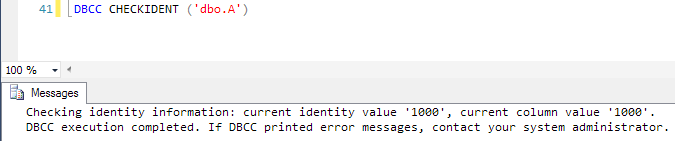
DBCC CHECKIDENT(), passing in your table name.

NOTE: I’ve just given you a potentially dangerous command as it has some optimal parameters that can break stuff. Do me a favour and make sure you’re not on Production.

…see the above? How it’s in bold? Do me a favour and double check you’re not on Production? Cheers!…

CheckIdentResultsA

so we’ve looked into the future and we can tell that with sp_help and DBCC CHECKIDENT, our future identity will be:

DBCC CHECKIDENT().current identity value + sp_help.increment


Now say that part of our query is only interested in rows where x1 = 1.
The most basic way to create our temporary table with this information is probably the one that the majority would use:

SELECT * INTO #temp FROM dbo.A WHERE x1 = 1;

SELECT * FROM #temp;

…Nice, simple, easy. 3 things that we want….

SelectFrom#Temp

And if we were to ALT+ F1 #temp we would get the following:

TempIdentity

Same identity!…

So with the same identity, we have the same current identity value, right?

DBCC CHECKIDENT('#temp')

CheckIdentResultsTemp

WRONG!…

Now I like this.
I appreciate this.
I’m thankful for this.

But I’m not sure why exactly this happens, apart from SQL Server is smart enough to know that it’s not going to need the exact same current identity value for this new table.
Using a (slightly depreciated) command

SET STATISTICS PROFILE ON;
SELECT * INTO #temp FROM dbo.A WHERE x1 = 1;

IdentityChangeSQLSERver

..it seems like SQL Server is changing the identity for you…


Now just to make this even more confusing, we run the following which for me shows that the last x1 value is 2.

SELECT * FROM dbo.A ORDER BY A_ID DESC;

LatestAx1

So what I’m expecting is that if we were to input this into a temporary table, we wouldn’t expect to see that setidentity…-7.

SET STATISTICS PROFILE ON;
SELECT * INTO #temp2 FROM dbo.A WHERE x1 = 2;

setidentShouldntBethere

But it’s there!…

Fine, okay so, just means that our current identity value has been changed!

So we run our DBCC CHECKIDENT and…

DBCC CHECKIDENT ('#temp2')

takeAwayIdentButRemainTheSame

No change.


And that’s my problem!
I don’t have an answer for this at the moment but when I figure this out, I’ll let you know, and if anyone has the answer, feel free to share 🙂

But at least I have a partial answer:

Question: When subtracting 7 from a value equal no change?
Answer: When SQL Server is involved.


Output over cursors

I am not pro-cursor. I am not, however, extremely anti-cursor.

I think that if there is a cursor used for a certain problem it just means we don’t know enough about the problem, the data or the code to think of a better solution.

But I’ve had an experience with cursors and, for my cases, found a better way.

That is what this blog post is going to be about, a case where we were using a cursor until we realised a better solution for it.


Background:

We have a weird table.

It’s our fault though as we’ve made it weird, we haven’t properly normalised it and it’s basically just a massive catch-all for records and for some strange reason, only 1 in 10 records have a ticket number.

So let’s create it!

-- Create the test table.
CREATE TABLE
    [dbo].[ProductActions]
    (
    [product_action_id]    INT IDENTITY(0, 1) PRIMARY KEY,
    [product_id]           INT,
    [allowed_action_id]    INT,
    [ticket_number]        VARCHAR(20),
    [date_actioned]        DATE
    );

-- Populate it.
WITH
    L0    AS(SELECT 1 AS c UNION ALL SELECT 1),
    L1    AS(SELECT 1 AS c FROM L0 AS A CROSS JOIN L0 AS B),
    L2    AS(SELECT 1 AS c FROM L1 AS A CROSS JOIN L1 AS B),
    L3    AS(SELECT 1 AS c FROM L2 AS A CROSS JOIN L2 AS B),
    L4    AS(SELECT 1 AS c FROM L3 AS A CROSS JOIN L3 AS B),
    L5    AS(SELECT 1 AS c FROM L4 AS A CROSS JOIN L4 AS B)
INSERT dbo.ProductActions
    (product_id, allowed_action_id, date_actioned)
SELECT TOP (10000000)
    product_id = ROW_NUMBER() OVER (ORDER BY (SELECT NULL)) % 5,
    allowed_action_id = (ROW_NUMBER() OVER (ORDER BY (SELECT NULL)) + 5) / 5,
    date_actioned = CAST(DATEADD(DAY, (SELECT ABS(CHECKSUM(NEWID())) % 50000), 0) AS DATE)
FROM L5;

UPDATE dbo.ProductActions
SET ticket_number = (CASE
                     WHEN product_action_id % 10 = 0
                     THEN 'TCKT'
                           + REPLACE(QUOTENAME(product_action_id, ''''),'''','')
                     ELSE NULL
                     END);


…that took around 1 minute for 10,000,000 records, including the create and update statements…

Now say something diabolical happens, a bad delete statement, a disgruntled employee who just won the lottery, a chimpanzee riding on a segway, whatever but for some reason all the records holding our ticket numbers get deleted.
However, thankfully (not sure if that’s the right word) we have Excel sheets of the records that were dropped.

ticketNumbersDeleted

… 9 seconds! 9 seconds for that wealthy employee/chimpanzee to cause havoc…

However, we don’t have everything; we have the product_id and the allowed_action_id.
So the business tells us that the dates don’t matter, it just needs those records back and those ticket numbers!


What we did:

Cursors. (I know, I’m sorry.)

However, we had problems.
Our table had a lot of traffic so we weren’t guaranteed an unbroken sequential range of identifiers that we could update.

And we couldn’t remove these foreign inserts from our range as we had no way of identifying which was our records and which were foreign records.

So we created a cursor. Not a performance tuned cursor since we were relatively new to SQL at the time but a run-of-the-mill, Google what it is and grab the template off the internet cursor.

Steps:

  1. Import the records into a holding table
  2. Give the table a sequential identifier for ordering
  3. Get the first record
  4. Insert it into the original table
  5. Grab the identity of the insert we just inserted
  6. Update it to have the correct ticket number
  7. Grab the next record and repeat steps 4 – 6
  8. Finish

All together 8 steps (although steps 3 – 7 are done around 1 million times) but how fast is it?

Step 2:

ALTER TABLE
dbo.DeletedRecordsPaper
ADD [ID] INT IDENTITY(0, 1);
GO

…around 34 seconds, surprisingly long…sign of things to come?…

Steps 3 – 7:

DECLARE @prodID INT,
@allowed INT,
@entered INT;
-- Start of Step 3

DECLARE FillMissingRecords
CURSOR FOR
SELECT product_id, allowed_action_id
FROM dbo.DeletedRecordsPaper
ORDER BY ID ASC;

OPEN FillMissingRecords

FETCH NEXT
FROM FillMissingRecords
INTO @prodID,
@allowed

WHILE @@FETCH_STATUS = 0
BEGIN  -- Step 4
INSERT dbo.ProductActions
(product_id, allowed_action_id, date_actioned)
SELECT @prodID,
@allowed,
GETDATE();
-- Step 5
SELECT @entered = SCOPE_IDENTITY();
-- Step 6
UPDATE dbo.ProductActions
SET ticket_number = 'TCKT' + CAST(@entered AS varchar(10))
WHERE product_action_id = @entered;
-- Step 7
FETCH NEXT
FROM FillMissingRecords
INTO @prodID,
@allowed

END

CLOSE FillMissingRecords

DEALLOCATE FillMissingRecords;

How’d it do? Well it worked; 1 million records took 9 minutes and 35 seconds though.

…9 minutes and 35 seconds…9 minutes and 35 seconds?!?…I could have recreated the table 9 and a half times in that time! I knew it was going to be slow, I even went out and got a coffee while I was waiting but C’MON!!!!

So altogether, with the adding of the sequential identifier, it took 10 minutes to run.

Now I can’t remember why exactly but this happened a few times so we had to run this a few times.


What we learned:

1). Eventually monkies improve with using keyboards, so too do humans and 2). it’s SQL Server. Use Set Theory!

Enter OUTPUT

Looking at this issue the main problem that we could see was that we needed to know what records we had inserted to update them with a ticket number.

We thought that we couldn’t figure out what we had inserted without using SCOPE_IDENTITY, we didn’t know about the inserted table, we didn’t know about variable tables, essentially we didn’t know about OUTPUT.

Steps:

  1. Import the records into a holding table
  2. Declare a holding table for the identities
  3. Insert all the records into the original table and output the values to our holding table
  4. Update all the records inserted to have the correct ticket number
  5. Finish

All together 5 steps, already an improvement, but that’s just steps, not performance. Is it an actual performance improvement?

…to be honest, if it was anyways faster than 9 minutes, I’d be happy…

-- Step 2
DECLARE @entered
TABLE
(
entered_id INT
);

-- Step 3
INSERT dbo.ProductActions
(product_id, allowed_action_id, date_actioned)
OUTPUT inserted.product_action_id
INTO @entered
SELECT product_id,
allowed_action_id,
GETDATE()
FROM dbo.DeletedRecordsPaper;

-- Step 4
UPDATE pa
SET ticket_number = 'TCKT' + CAST(entered_id AS varchar(10))
FROM dbo.ProductActions AS [pa]
JOIN @entered AS e
ON pa.product_action_id = e.entered_id;


29 SECONDS!!!! 1 million rows in 29 seconds!

So we’ve gone from 1 million rows in 9 minutes 35 seconds (~1,730 rows a second) to 1 million in 29 seconds (~34,482 rows a second).

…those results flustered me so much that I forgot maths so if anybody wants to work out that improvement percentage, please let me know. I want to write that one down!…


Conclusion:

The most dangerous phrase in the English language is probably “what does this button do?”
The second most dangerous is “we’ve always done it that way”.
There’s always room for improvement testing (on the right system i.e. NOT PRODUCTION) and OUTPUT over CURSORS any day.