Warning: This is barely SQL Server/PowerShell related. It is Microsoft product related if that helps?
In the beginning…
One thing that I am starting to appreciate more and more as time goes by is Documentation.
If you’ve ever worked on a system with no documentation in place then you know of the frustration, heartbreak and rage that this instills when you’re trying to get to know the system, or even trying to troubleshoot something on that sytem.
But even the act of writing documentation can have some benefits, I’d argue that you would be hard-pressed to find something that forces you to learn about a topic more than trying to write clear and concise documentation for someone else.
What’s your problem?…
In a strange side-effect of trying to become more responsible as a DBA, I’ve actually inherited a slight case of obsessiveness about certain things.
Words need to be spelled correctly, uppercase words need to be in uppercase, and with regard to this post…
I DON’T WANT A SPELL-CHECK ERROR FOR USING A PASSIVE VOICE!!!
It’s documentation. Now I can understand that, depending on your work environment, you can write in a more upbeat and active way. But for documentation, I don’t see anything wrong with this sentence:
Provision one (1) domain account, with no privileges, per service that will be run.
More like Passive Aggressive…
I’m fully expecting the paper clip guy to appear any second and start spouting “Looks like you’re writing in the Passive Voice…”
Calm yourself Word…
When this blue squiggly line (it is blue, right? I’m slightly colourblind) started to pop up everywhere on my document, and after checking things three times, I figured enough is enough and went about turning this off.
Here’s how I did it so that you can to!
Now I’m lucky enough that work have MS Word 2016, so if you have an older version YMMV. If you don’t have any version of Word, then your mileage will vary!
Go to “File | Options | Proofing” and scroll down to the section marked “When correcting spelling and grammar in Word”.
I’m probably not going to touch all these…
Click the “Settings…” button beside the ” Writing Style:” and “Grammer and Style” dropdown box. This should open up the following window.
Passive Sentences!!! Grr!!!
Uncheck the “Passive sentences” checkbox and click “OK”. Click “OK” on the “Proofing” window as well and you should get back to your main Word screen.
And here is where the magic happens. Our blue (purple?) squiggly lines have disappeared!
Wrap it up…
You could just click ignore when spell-checking but I tried that. It ignores it once and then the moment that it spell-checks again, it picks up these “errors” again. If there is one thing worse then errors, it’s repeating errors.
Plus isn’t that part of we, as DBAs strive for?
We’re not content with just the quick fix, but want to identify and correct the underlying problem.
Now the reason that this is the topic of this month’s T-SQL Tuesday is nicely spelled out by the host himself:
Now, more than ever, Microsoft has started to respond to Connect requests and get ’em fixed not just in upcoming versions of SQL Server, but even in cumulative updates for existing versions.
If you’ve kept an ear to the ground and an eye out on the social media, (seriously get on Twitter if you haven’t already; with #sqlhelp and #sqlfamily, you’ll never be alone, stuck, and/or bored again), you’d realise that this is true. Microsoft has engaged more than ever with it’s audiences, from hiring a PowerShell developer to actively engaging in various Trello Channels. So much so that a twitterbot was created to keep track of Connect items closed as fixed (Closed As Fixed) by MVP Chrissy LeMaire ( blog | tweets ).
Shameless Plug:
Now, I happen to have a Connect item and I’m going to link to it here. I can do this as this blog shares a commonality with Lesley Gore’s birthday party song. (It’s mine and I can cry if I want to)
However, this T-SQL Tuesday topic has a secondary agenda of getting these Connect items up-voted if we agreed with them. So with that in mind, and seeing how I already had a Connect item open dealing with Views, I took a look at other Connect items around Views to see what else there was and up-voted what I could.
That’s not contributing enough, I hear you say? (Yes, I’ve already heard the “you’re hearing voices” joke, and yes it is slightly funny). Well that’s fine, because I’m going to highlight and link the Connects I found below for you guys to decide.
So go on! Pretend you’re the Emporer of Rome, a Julius/Julia CTE-aeser, determing the fate of these gladitorial Connect items. Do they get the thumbs up? Or the thumbs down?
Battle of the Bugs:
The Good…
First of all, lets see what we’re running on here…
SELECT @@VERSION
I really should be doing these against SQL Server 2016… 🙁
What would happen if I told you that, with regards to a view, sometimes inserting into the table could fail? Well that’s what this Connect item from Dave_Ballantyne found, along with the reason.
CREATE TABLE myTable
(
    Id integer not null,
    InView char(1) not null,
    SomeData varchar(255) not null
)
GO

CREATE VIEW vwIxView
WITH SCHEMABINDING
AS
SELECT
    ID,
    Somedata,
    LEFT(SomeData, CHARINDEX('x', SomeData) - 1) AS leftfromx
FROM
    dbo.myTable
WHERE
    InView ='Y'
GO

CREATE UNIQUE CLUSTERED INDEX pkvwIxView ON vwIxView(Id)
GO
Now that we have the groundwork laid out, it’s time for our insert attempt:
Do you see a LEFT() or SUBSTRING() ANYWHERE there???
He’s even gone so far as to give an explanation as to why this happens!
This is due to the compute scalar being executed prior to the filter.
Taking a look at the estimated execution plan, we can see that he’s right!
Let’s do it first, then see if we should have!
Imagine trying to troubleshoot what was causing the inserts to fail? Horrible! I can imagine tearing my hair out at that one!
I have this done as “The Good” just for the fact that, not content to just report the bug, Dave_Ballantyne even went so far as to find the possible cause. Now it’s just up to Microsoft to get to the fixing…
CREATE TABLE test (A int)
GO
CREATE VIEW vtest WITH SCHEMABINDING
AS
SELECT t1.A, t2.A as A2
FROM dbo.test T1
JOIN dbo.test T2 ON T1.A=T2.A
GO
The problem occurs when we try to add a unique clustered index on this bad boy:
CREATE UNIQUE CLUSTERED INDEX UCL_Test
on dbo.vTest (A, A2)
Ever get those times where you just can’t stand yourself?
Now, I originally put this down as “The Bad” because I thought that the issue could be down to trying essentially index the same column twice but that’s not the case…
CREATE TABLE dbo.B (col1 tinyint, col2 tinyint)
GO
CREATE VIEW dbo.SecondOne
WITH SCHEMABINDING
AS
SELECT t1.col1, t2.col2
FROM dbo.B AS t1
JOIN dbo.B AS t2 ON t1.col1 = t2.col1
GO
CREATE UNIQUE CLUSTERED INDEX UCL_test
ON dbo.SecondOne (col1, col2)
…I mean After-A-Massive-Meal-Cant-Stand-Yourself
In the end, the reason that I have this in “The Bad” section is that I went to the documentation and read this part…
The SELECT statement in the view definition must not contain the following Transact-SQL elements: […] self-joins […]
Now it’s unknown whether this was there when this Connect item was created, but it’s there now (and I didn’t have enough time to re-plan this blog post)
…and The Bug-ly.
In my quest through the magical lands of Connect I stumbled across this little beauty of a bug by Anatoly V. Popov that I had to mention as “The Bug-ly”.
Yes, I know it’s the same as my one but dammit if I don’t think it’s a bug! That’s why it’s getting my “The Bug-ly” title.
This leaves me with a bit of a conundrum though…Do I close mine and comment on this one to get re-opened? Or do I try and continue to push on my one?
To be honest I don’t know which option to choose but, for anyone new to SQL Server, filing a Connect Item is an exciting but nerve-wracking time.
Exciting because you’ve worked with SQL Server enough to think you know how something should be done.
However, it’s nerve-wracking because you haven’t worked with SQL Server for long enough to know if you are just whining or have an actual item to be taken seriously.
Finding this Connect item was a small little shot of validation for me. Just a little something to say “Hey, I thought this too and I’m with you”.
Summary
It’s a great thing that Microsoft have started to respond to the Connect Items again and going through them you realise how different people are using SQL Server in ways that you didn’t even think to imagine.
So check out a few, leave your comment and up-vote/down-vote as you see fit.
Now I’ll admit that I didn’t have any plan to write a blog post before I got the challenge as I’ve been steadily getting busier with work/study/other commitments, so apologies if it’s a bit long, rambling, and not thought through fully.
Anyway, happy birthday Arun, here’s your blog post:
Understanding “Scan Counts 0, Logical Reads N”
Have you ever run SET STATISTICS IO ON; ?
I’ll confess that I do it a lot, especially when I am performance tuning. Yet, like most things in SQL Server, I don’t fully understand it…yet!
Now don’t get me wrong, the little that I understand is extremely helpful, but recently I had a case where I didn’t understand the output of STATISTICS IO , and asking my Senior DBA got me the look from him that I come to think of as ‘The You_Are_Either_Joking_Or_You_Are_Being_Stupid_Again Look’.
So to document my stupidity, here’s the question for that look.
How come the Logical Reads from STATISTICS IO are so high when it says Scan count is 0?
tl;dr – They are related but not exactly a 1:1 relationship. Plus a scan count of 0 does not mean that the object wasn’t used at all.
Logical Reads:
Let us just get this definition out of the way as it’s very short, sweet, and to the point. Logical Reads are the…
Number of pages read from the data cache.
Right, great, got’cha. Logical reads, 8kb pages, read from the data cache. If your STATISTICS IO reports logical reads 112 then you’ve read 112 pages from the cache. Simples!
Scan Count:
This is the blighter that got me the look…well more like ‘my misunderstanding of what Scan Count means’ got me the look but it still holds my contempt at this moment in time.
My previous intuitions about this guy was…
“Scan count is the number of hits the table/index received”
(THIS IS NOT CORRECT! …and why it isn’t down as a full quote).
Let’s check out the definition again and see what it has to say for itself.
Scan count is the…
Number of seeks/scans started after reaching the leaf level in any direction to retrieve all the values to construct the final dataset for the output.
That’s a very specific definition isn’t it? It’s not all of the definition though, there’s more! And it is this “more” that I want to focus on.
Testing The Defintions
First, things first, let us set up our query environment.
USE [tempdb];
GO

SET STATISTICS IO ON;
GO
Next paragraph…
Scan count is 0 if the index used is a unique index or clustered index on a primary key and you are seeking for only one value. For example WHERE Primary_Key_Column = <value>.
Well let’s see about that!
CREATE TABLE dbo.Unique_DefinedUnique
(
 col1 INT NOT NULL PRIMARY KEY
);
INSERT INTO dbo.Unique_DefinedUnique (col1)
SELECT x.n FROM (VALUES (1), (2), (3), (4), (5)) AS x(n);

CREATE UNIQUE NONCLUSTERED INDEX uci_Unique_DefinedUnique_col1
ON dbo.Unique_DefinedUnique ( col1 )
GO

SELECT col1 FROM dbo.Unique_DefinedUnique WHERE col1 = 1;
okay…maybe it does…
Never mind, the next paragraph please!
Scant count is 1 when you are searching for one value using a non-unique clustered index which is defined on a non-primary key column. This is done to check for duplicate values for the key value that you are searching for. For example WHERE Clustered_Index_Key_Column = <value>.
I don’t believe you!
CREATE TABLE dbo.Unique_NotDefinedUnique
(
col2 INT NOT NULL
);
GO
INSERT INTO dbo.Unique_NotDefinedUnique (col2) VALUES (1), (2), (3), (4), (5);

CREATE NONCLUSTERED INDEX nci_Unique_NotDefinedUnique_col2
ON dbo.Unique_NotDefinedUnique ( col2 )
GO

SELECT col2 FROM dbo.Unique_NotDefinedUnique WHERE col2 = 1;
Fine…you got me there too…
Final bit!
Scan count is N when N is the number of different seek/scan started towards the left or right side at the leaf level after locating a key value using the index key.
Hmmm, so if we have duplicate values, then this will happen?…
Nah, ridiculous!
CREATE TABLE dbo.NotUnique
(
col3 CHAR(1) NOT NULL
);
GO

INSERT INTO dbo.NotUnique (col3)
VALUES
('A'), ('A'), ('B'), ('B'), ('C'), ('C'), ('D'), ('D'), ('E'), ('E'),
('F'), ('F'), ('G'), ('G'), ('H'), ('H'), ('I'), ('I'), ('J'), ('J');
GO 2

CREATE NONCLUSTERED INDEX nci_NotUnique_col3
ON dbo.NotUnique ( col3 )
GO

--Let's try it with 2 and then 3!!!

SELECT col3 FROM dbo.NotUnique
WHERE col3 = 'A' OR col3 = 'B'

SELECT col3 FROM dbo.NotUnique
WHERE col3 = 'A' OR col3 = 'B' OR col3 = 'C'
Alright, alright! I was an idiot!
Putting away my toys…
DROP TABLE dbo.Unique_DefinedUnique, dbo.Unique_NotDefinedUnique, dbo.NotUnique;
Round Up:
I was confused about the Scan count being 0 but logical reads not being 0. How can the scan count not actually scan/seek anything?
But it is scanning/seeking!
Read the Scan Count definition again…I’ll capitalize the words that I glossed over
Number of seeks/scans STARTED AFTER REACHING THE LEAF LEVEL in any direction to retrieve all the values to construct the final dataset for the output.
Scan count of 0 occurs when there is a unique index or clustered index on a primary key and you are seeking for only one value. The word of the day is…”Unique”.
So because the unique index looking for a unique value in a column guaranteed to be unique, it’s not so much that the query isn’t looking for a value, it’s more that once the query reaches the leaf level it already knows that it’s on the value it needs!
Since it doesn’t look any more “after reaching the leaf level”, the scan count is allowed to be 0.
This explains why, if the value is unique but not guaranteed to be so (either the index, value, or column is not guaranteed unique) the query has to do 1 scan/seek to check that the next value isn’t what it wants.
Therefore, Scan Count will be 1…
And I’ll leave it as an exercise to figure out why Scan Count N is Scan Count N.
(Hint: it’s because Scan Count N)
Take Away:
I sometimes find the documentation dry and not terribly interesting but I don’t like the “You_Are_Either_Joking_Or_You_Are_Being_Stupid_Again” look more.
So read the documentation, study what you are doing, know why things do what they do…
I’m becoming more and more of a fan of Powershell the more that I interact with it. And I’m a big fan of the work that those over at dbatools are doing (seriously, check it out and also check out their Slack channel).
So when reading an article by Steve Jones (b|t) that mentions using Powershell, especially dbatools, I took immediate attention!
However, while reading the blog, what jumped out at me was the fact that dbatools copies the logins and the passwords. I think that’s epic and saves so much hassle, especially with migrations and environment creation.
But when you script out a login in SSMS, you get the following “warning comment” (and this comes straight from Microsoft) :
/* For security reasons the login is created disabled and with a random password. */
I understand why you don’t want to script out a login’s password for security reasons but disabling it…does that even do anything?
Something that I only recently learned is that, for logins with high privileges, disabling them is not enough; they must be removed.
Overkill, I hear you say?
Example, I retort!
Example:
I will admit that for my example to work, there needs to be help from a member of the securityadmin server role login. So for this example we’re going to have…
A disabled sysadmin login,
A “compromised” securityadmin login,
An “attacking” low-privilege login.
Window 1 (High Permission Account):
-- Create a high privilege login (HPL)
CREATE LOGIN [AllThePower]
    WITH PASSWORD = '1m5trong15wear!';

ALTER SERVER ROLE sysadmin
    ADD MEMBER AllThePower;

-- Disable it.
ALTER LOGIN AllThePower DISABLE;

-- Create a "compromised" login
CREATE LOGIN Enabler
    WITH PASSWORD = 'AlreadyHereButCompromised';

-- Make them part of security so can grant permissions
ALTER SERVER ROLE securityadmin
    ADD MEMBER Enabler;

-- Create a low privilege login (LPL)
CREATE LOGIN Copycat
    WITH PASSWORD = 'NotAsStrongButDoesntMatter';
So now we have all our actors created, we need to connect to the database with all 3 accounts.
Simple as “Connect” -> “Database Engine” -> Change to SQL Auth. and put in the details above for who you want.
Window 2 (CopyCat):
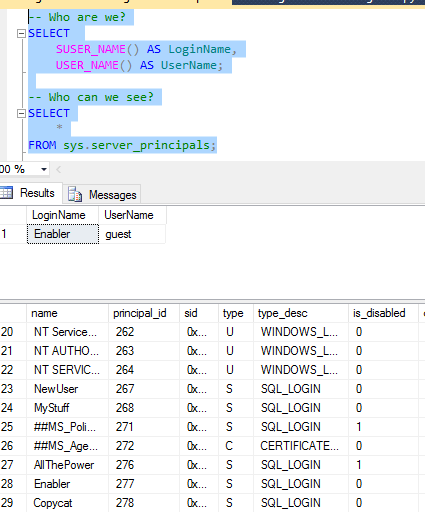
First things first, check who we are and who can we see?
-- Who are we?
SELECT
    SUSER_NAME() AS LoginName,
    USER_NAME() AS UserName;

-- Who can we see?
SELECT
    *
FROM sys.server_principals;
We can’t see “Enabler” or “AllThePower”
Okay, so we can’t see it but we know that it’s there.
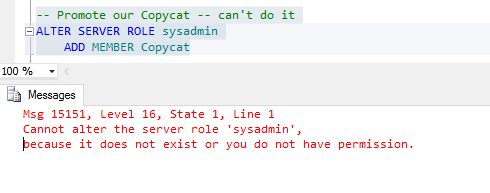
Let’s just cut to the chase and start “God-mode”
-- Can we get all the power
ALTER SERVER ROLE sysadmin
ADD MEMBER CopyCat;
It was worth a shot…
Can we impersonate it?
-- Can we impersonate AllThePower
EXECUTE AS LOGIN = 'AllThePower'
SELECT
    SUSER_NAME() AS LoginName,
    USER_NAME() AS UserName;
I’ve put the different possibilities on individual lines…We “do not have permission” btw
Time to go to our compromised account:
Window 3 (Enabler):
Now, who are we and what can we see?
Sauron: I SEE YOU!
Notice that “Enabler” as part of securityadmin can see the disabled “AllThePower” login?
Great, we can see it, so let’s promote our CopyCat login!
Look but don’t touch
So even though we’re now a member of the securityadmin role, we still can’t promote our login!
I think you’d be safe in thinking that people would give up here, but we know from server_principals that “AllThePower” is there, even though it’s disabled!
So even though we don’t have the ability to promote our login, we do have something that we can do in our power.
GRANT IMPERSONATE.
-- Give CopyCat Grant permission
GRANT IMPERSONATE ON LOGIN::AllThePower TO CopyCat;
Every little helps
Window 2 (CopyCat):
Now can we impersonate our Disabled login?
Whoooo are you? Who-oo? Who-oo?
And can we get all the power?
I know an uh-oh moment when I see it…
Finally, we’ll revert our impersonation and see if we actually are sysadmin?
-- Go back
REVERT;
SELECT
SUSER_NAME() AS LoginName,
USER_NAME() AS UserName;

-- Are we superuser?
SELECT IS_SRVROLEMEMBER('sysadmin') AS AreWeSysAdmin;
I..HAVE..THE POWER!!!
And now I can do whatever I feel like, anything at all!
Summary:
I’m a fan of removing high-permission accounts that are not needed but I’ve never put into words why. Now I know why disabling is just not enough and, for me, removing them is the option.
I’m mainly writing this as documentation for myself as, in the end, this is the original purpose of this blog, to document SQL Server and new aspects of it that I learn and try.
Personal Template
I’ve always had a little block with regard to this as, for database permissions, I always followed a template in my head:
USE <database>
<Give/Take away> <what permission> <On What> <To Whom>
It’s The Little Things That Trip You
With CREATE permissions this isn’t the case; there is a piece of the above template that isn’t needed, and it’s quite easy to see why when I sat down and thought about it.
Specifically, it’s this bit:
<On What>
I’m granting CREATE permissions; since I haven’t created anything, I can’t grant the permission on anything.
So for CREATE permission, I have to modify my template a bit:
USE <database>
<Give/Take away> <what permission> <To Whom>
If I use this now as a template to a GRANT CREATE VIEW, it will work:
USE [localTesting];
GRANT CREATE VIEW TO [testUser];
Recently I was asked to create a temporary user with SELECT permissions on a database.
So far, not a problem. Taking advantage of the pre-defined roles in SQL Server, I just add this new user to the pre-defined role [db_datareader], which grants SELECT permissions to all tables and views in a database.
Why would I grant SELECT permissions this way and not manually choose the tables and views that this user could connect to?
Well,
This is a test server so there is no sensitive information held that I’m worried about blocking access to,
I didn’t get the exact requirements of the tables this user is to query so I don’t know which tables/views to grant access to and which to deny access to (I consider this a mistake on my part and something I have to act on next time),
The test user is only required for 2 days, after which it is getting reviewed and deleted as quickly as I can, and
Efficiency.
Efficiency, how?
Why grant SELECT on tables individually when I can grant on all tables in 1 fell swoop?
Recently I had to check on the nature of my check constraints and foreign keys; whether they were trusted or not.
select name, is_not_trusted from sys.check_constraints;
select name, is_not_trusted from sys.foreign_keys;
In case you are wondering, this has some Query Optimiser (QO) benefits so it’s a definitely a bonus to ensure that they are trusted.
However, something that should have taken 5 seconds and be a no-brainer, took me 30 seconds and required a bit of memory power on my part.
All because I had a problem with my SQL Server Intellisense, and said SQL Server Intellisense stopped working.
This forced me to drudge up these names out of my memory from whatever blog post or BOL entry I read them in.
This, in turn, got me wondering; how well do you really know your sys tables?
If your intellisense broke tomorrow, would you know your Dynamic Management Objects (DMO)?
Now before you dismiss this notion as simple, remember that it is not just sys tables that you have to know. This will test your knowledge on your application tables, your columns, stored procedures and functions.
Do you know all their names? Which table has the column “ID”, which has “<table_name>ID” and which has “<table_name>_ID”?
Test yourself:
The fix for my problem with SQL Server Intellisense not working is going to be reversed to allow you to test your knowledge.
In the dialog box, Tools -> Options -> Text Editor -> General, there are two checkboxes under the “Statement completion” section:
Auto list members
Parameter information
If you uncheck these two checkboxes, your intellisense is gone!
Try it out, even for 5-10 minutes.
Hopefully, with your Intellisense gone, your sense will remain.
Kalen Delaney ( blog | twitter ) has an excellent blog post about Windows Fast Startup and, while I’m not going to repeat what she has said here because, like I already mentioned, it’s an excellent post and I encourage you to read it ( and maybe give her a lil’ subscribe 😉 ), what I will mention is that I encountered this feature with my new laptop and had it interfering with my SQL Server testing (again read her post as to possible causes why).
Using Powershell for documenting Replication had me wondering if there was a way I could get around this using Powershell. So while this is another post that is not about SQL Server, it is about Powershell.
Which pops open a window saying the computer will shutdown and, after a delay, that’s what it does.
At this stage I’ve read enough documentation to know that shutdown /s
doesn’t follow the standard Verb-Noun convention of Powershell and that delay was slightly annoying.
Plus, everyone raves about the Get-Help commandlet so I figured I would try that.
Get-Help *shutdown*
Gave me a list of commands and one of them seemed to fit what I wanted.
Get-Help Stop-Computer;
Summary
3 things here.
You now know how I turn my computer off all the time
It’s amazing what you can do with Powershell, and
Kalen says
So you might already know, but I didn’t know, until I learned it, of course.
I didn’t know, but found a work-around so didn’t learn it.
I’d advise you to follow Kalen’s approach (as I’m going to try from now on) but, hey, at least you now know mine.
No matter who wins Powershell or T-SQL, the GUI loses!
It’s T-SQL Tuesday time!
Chris Yates (blog | twitter) has given the T-SQL bloggers a “carte blanche” with regard to this month’s theme so even though this T-SQL Tuesday falls on his birthday, he’s the one giving us a gift (awfully nice of him I think).
So a white blank page to work with…in this case it seems only appropriate to write about Powershell. Mainly because if I were to write about it normally, all you would be getting is a white blank page. Basically, about Powershell, I don’t know much…
Therefore to start off this blog post, a little back story about why I’m talking about Powershell is appropriate…
Documenting Replication.
If you really want to get up to scratch with something that you are working with then you can’t go wrong with documenting it. Or at least that’s what my Senior DBA told me just before he went back to his laptop laughing maniacally.
So needing a high level documentation of the publications, articles and article properties of what we replicate, I turned to the only thing I knew at the time; the GUI.
GUI.
Now, due to an unfortunate incident when I was a Software Support Engineer that involved a 3 week old backup and a production database, I prefer to not to use the GUI if I can help it.
I’m not joking about that as well, if there is ANY way that I can accomplish something with scripts instead of the GUI, I will take it!
Especially when the need was to document the properties of over 100 articles, I was particularly not looking forward to opening the article properties window for each of the articles and copying them out individually.
100 X 40 = 4000 no thanks
Scripts
Unfortunately, in this case, the scripts were only partially useful.
but the article properties themselves remain elusive!
From BOL, the only way to actually interact with them seemed to be when you were creating the articles or if you wanted to change them, yet nothing for just viewing the states of them.
Finally after a lot of Google-fu, I managed to get most of the schema options with a good few temp tables and Bitwise operators…
but nothing I could find helped me with the create commands.
These create commands are kinda important when you think about what they do.
Drop the object, truncate all data and the delete data. The delete data option is probably most dangerous if you have a row filter set up as you may not even be aware that data has been deleted until it’s too late and users are screaming at your door!
So in a blind fit of panic and a desperate attempt to thwart my GUI foe, I turned to Powershell.
Powershell
I was thankfully able to find an elegant, well-explained script by Anthony Brown and then proceeded to butcher it without remorse until it returned what I wanted.
I’ve included the full script at the end of this post with a few…shall we say…forewarnings.
The main point that I had to add was simply this:
PseudoCode:
For whatever article on now,
get the article properties
where the source article is what we’re looking for
return only the PrecreationCommands
formatted in a list
and returned in a string:
one of the best thing about SQL Server is, that for all it’s restrictive syntax and rules, there is no 1 way to do anything.
…and there is no excuse for relying on the GUI, unless you want to!
Powershell is an amazing tool to add to your belt and one that I’m definitely going to learn more about.
I challenge you to think about an aspect of your work that is not automated or for which you use the GUI for (shudder).
Now see if there’s a way around it…
Final Powershell Script
The following is the final script used to get the code. I make no apologies for it as I don’t know Powershell yet it’s served it’s purpose and then some. It has returned my creation commands, taught me some fundamentals of the language and ignited a desire to learn it.
However I do apologise for the look of the script. There is something configured with the blog that squashes the script and requires a scroller, I’m working on fixing it.
# Load the assembly needed. (Only required once at the start).
[System.Reflection.Assembly]::LoadWithPartialName("Microsoft.SqlServer.Rmo")
# Clear screen before each run
Clear-Host;

# Connect to the server.
$servername = "insert server here"
$repserver = New-Object "Microsoft.SqlServer.Replication.ReplicationServer"
$srv = New-Object "Microsoft.SqlServer.Management.Common.ServerConnection" $servername
$srv.Connect()
$repserver.ConnectionContext = $srv

# Connect to the database
$databasename = "insert database here"
$repdb = $repserver.ReplicationDatabases[$databasename]

# Connect to the publication.
$publicationname = "insert publication here"
$publicationobject = $repdb.TransPublications[$publicationname]

<#
# Everything (troubleshooting)
$publicationobject.TransArticles | Where-Object SourceObjectName -EQ $article
#>

# Get everything. (from here on out, it's Butcher town :-( )
$Schoptions = ($publicationobject.TransArticles | Select-Object SourceObjectName, SchemaOption, PreCreationMethod )
$Schoptions `
| ForEach-Object `
{ `
$NewLine = "`n"
$WorkOnNow = $_.SourceObjectName

# Get SchemaOptions details.
$Schoptions = ($publicationobject.TransArticles | Where-Object SourceObjectName -Like $WorkOnNow | Select-Object SchemaOption | Format-List | Out-string )
$schemaoptions2 = (($Schoptions -split ", ").Trim() ) -csplit "SchemaOption : "
$OptFormatted = ($schemaoptions2 | Where-Object {$_ -ne ""} | Where-Object {$_ -ne "PrimaryObject"} `
| ForEach-Object -Process `
{
Switch ($_)
{
"Identity" {"Identity columns are scripted using the IDENTITY property`t:`tTrue"}
"KeepTimestamp" {"Convert TIMESTAMP to BINARY`t:`tFalse"}
"ClusteredIndexes" {"Copy clustered index`t:`tTrue"}
"DriPrimaryKey" {"Copy primary key constraints`t:`tTrue"}
"Collation" {"Copy collation`t:`tTrue"}
"DriUniqueKeys" {"Copy unique key constraints`t:`tTrue"}
"MarkReplicatedCheckConstraintsAsNotForReplication" {"Copy check constraints`t:`tFalse"}
"MarkReplicatedForeignKeyConstraintsAsNotForReplication" {"Copy foreign key constraints`t:`tFalse"}
"Schema" {"Create schemas at Subscriber`t:`tTrue"}
"Permissions" {"Copy permissions `t : `t True"}
"CustomProcedures" {"Copy INSERT, UPDATE and DELETE stored procedures`t:`tTrue"}
default {"Extras present, please check"}
}
})

# Get PreCreationMethod details.
$CreationMethod = ($publicationobject.TransArticles | Where-Object SourceObjectName -Like $WorkOnNow | Select-Object PreCreationMethod | Format-List | Out-String)
$CreationMethod2 = (($CreationMethod -split ":").Trim() | Where-Object {$_ -ne ""} | Where-Object {$_ -ne "PreCreationMethod"} `
| ForEach-Object -Process `
{
Switch ($_)
{
"None" {"Action if name is in use `t : `t Keep existing object unchanged"}
"delete" {"Action if name is in use `t : `t Delete data. If article has a row filter, delete only data that matches the filter"}
"drop" {"Action if name is in use `t : `t Drop existing object and create a new one"}
"truncate" {"Action if name is in use `t : `t Truncate all data in the existing object"}
default {"Error! Creation Method Switch has failed"}
}
})

#Report the details.
$NewLine
$WorkOnNow
Write-Host '----------'
$OptFormatted
$CreationMethod2
$NewLine
}




![[SQL Server] How Well Do You know Your sys Tables? Test yourself](https://i0.wp.com/nocolumnname.blog/wp-content/uploads/2016/08/transactsqlgeneral.png?fit=750%2C439&ssl=1)


